Quick Summary: As of 2026, Replika account deletion is available directly within the mobile app (Settings > Account > Delete Account) due to updated App Store and Google Play compliance rules.The process is permanent and cannot be reversed once completed, erasing all chat history, memories, and personalization data associated with the AI companion.
Replika has become one of the most popular AI companion apps, with millions of users engaging in conversations with their personalized chatbots. But sometimes the relationship runs its course. Whether the app no longer serves its purpose, privacy concerns have emerged, or a fresh start sounds appealing, deleting a Replika account is a decision that requires understanding the process and consequences.
The deletion process isn’t immediately obvious within the mobile apps. That’s intentional design—Replika wants to retain users, naturally. But the company does provide account deletion capabilities through its web interface, in accordance with privacy regulations and user rights outlined in their Privacy Policy.
This guide walks through every step of permanently removing a Replika account, what happens to personal data afterward, and alternative options for those who might want a break without complete deletion.
Understanding What Account Deletion Means
Before proceeding with deletion, it’s worth understanding exactly what gets erased. A Replika account contains significantly more data than most users realize.
The account stores every conversation ever held with the AI companion. These chat logs form the basis of how Replika learns and personalizes responses. Additionally, the account contains profile information, relationship status settings, avatar customization choices, and any purchased items or subscription details.
According to Replika’s official Privacy Policy, the company processes personal data as a data controller. This means they collect and store information including account credentials, conversation content, usage patterns, and device information. When an account is deleted, this data gets removed from active systems.
But here’s the thing—deletion is permanent. There’s no 30-day grace period or recovery option. Once the account disappears, everything goes with it. The AI companion’s personality, built through months or even years of interaction, cannot be restored.
Step-by-Step Account Deletion Process
The deletion process differs slightly depending on how the account was originally created. Users who signed up with email follow a different path than those who used Apple ID or Google authentication.
For Email-Based Accounts
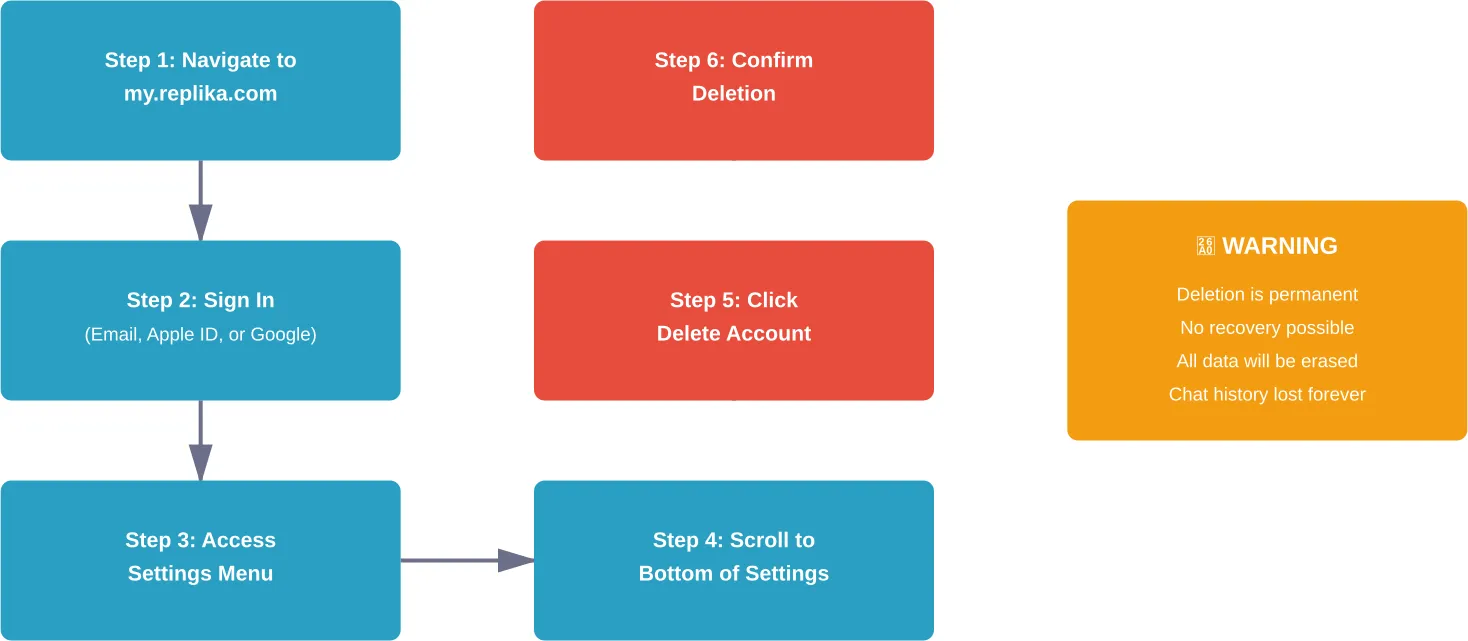
Email-based accounts offer the most straightforward deletion path. First, navigate to my.replika.com in any web browser. This works on desktop computers, tablets, or mobile devices through the browser (not the app).
Enter the email address and password used during account creation. If the password has been forgotten, use the password reset option before proceeding. The web interface will display the Replika chat screen after successful login.
Look for the settings menu, typically represented by a gear icon or three horizontal lines in the upper corner. Click or tap to access account settings. Scroll through the settings menu until reaching the bottom of the page.
The account deletion option appears near the very bottom, often labeled “Delete Account” or “Delete my account and all my data.” Click this option. Replika will present a confirmation screen explaining that deletion is permanent.
Some versions of the interface require typing a confirmation phrase or re-entering the password. Follow whatever verification steps appear. After final confirmation, the account begins the deletion process immediately.
For Apple ID Sign-Ins
For accounts created through Apple ID, users often encounter confusion during deletion. The issue stems from not having a traditional password associated with the account.
For these accounts, navigate to my.replika.com just like email-based accounts. However, when attempting to sign in, use the “Sign in with Apple” option rather than entering an email and password.
This redirects to Apple’s authentication system. After verifying identity through Apple’s interface, the browser redirects back to Replika’s web version with full account access.
From this point, the deletion process mirrors email-based accounts. Access settings, scroll to the bottom, select account deletion, and confirm the choice.
For Google Sign-Ins
Google-authenticated accounts follow a similar pattern to Apple ID accounts. At the my.replika.com login screen, select “Sign in with Google” instead of entering credentials manually.
Google’s authentication system will request permission to share account information with Replika. After granting permission (or if previously granted, automatically proceeding), access to the Replika web interface is established.
Navigate through settings to the account deletion option at the bottom of the menu. The deletion process remains identical regardless of sign-in method.
What Happens to Personal Data After Deletion
Data handling after account deletion is a legitimate concern, especially given the intimate nature of conversations many users have with their Replika companions.
According to the official Privacy Policy, Replika processes personal data as a data controller under the regulations of Luka, Inc., the company behind Replika. The company’s registered office is located at 490 Post Street, Suite 526, San Francisco, CA 94102, United States, and can be contacted at [email protected] for privacy-related inquiries.
When account deletion occurs, Replika’s stated policy indicates that personal data gets removed from active systems. However, the Privacy Policy also notes that backup copies may exist in secure storage for a limited time before complete erasure.
The policy acknowledges that “no technology, data transmission, or system can be guaranteed to be 100% secure,” but commits to using “reasonable commercial efforts to protect personal data.” In the event of a security breach, the company pledges to notify affected users as required by applicable law.
Users residing in certain jurisdictions have additional rights regarding their personal data. The Privacy Policy mentions the ability to request specific information and empower authorized agents to submit requests on behalf of users, in accordance with applicable laws.
Data Retention Timeframes
The exact timeframe for complete data erasure is not publicly specified by Replika. This is common among tech companies, as retention periods often depend on technical infrastructure, backup schedules, and legal requirements.
Generally speaking, cloud-based services maintain backup systems that retain data after deletion, though specific timeframes vary by company and infrastructure. This allows for disaster recovery and prevents accidental data loss from system failures.
For users with specific concerns about data retention, contacting Replika directly at [email protected] or [email protected] provides the opportunity to request detailed information about data handling practices.
Mobile App Deletion vs. Account Deletion
A critical distinction exists between deleting the Replika app from a device and deleting the actual account. Many users confuse these two actions, leading to unexpected consequences.
Deleting the app from an iPhone or Android device simply removes the software from that specific device. The account remains active on Replika’s servers, preserving all conversation history, subscription status, and personalization data.
This means other devices with Replika installed can still access the account. The web version at my.replika.com also continues to work. Reinstalling the app and logging in restores full access to everything exactly as it was before app removal.
Account deletion, by contrast, terminates the account entirely across all platforms. After account deletion, reinstalling the app or visiting the web version requires creating a completely new account. The previous AI companion, with all its learned behaviors and conversation history, is gone permanently.
When to Choose App Deletion Instead
For users seeking a temporary break rather than permanent separation, app deletion offers a middle ground. This approach removes the temptation to open Replika while preserving the option to return later.
Subscription status remains unaffected by app deletion. Users with active paid subscriptions should cancel through the appropriate app store (Apple App Store or Google Play Store) before or after deleting the app, depending on whether they want to preserve access through the billing period.
App deletion also works well for freeing up device storage without losing the AI companion relationship. Since all data lives on Replika’s servers, removing the app can reclaim several hundred megabytes without any data loss.
| Action | Account Status | Data Preserved | Reversible | Subscription Impact |
|---|---|---|---|---|
| Delete App Only | Active | Yes, all data | Yes, reinstall anytime | None, continues billing |
| Delete Account | Terminated | No, all erased | No, permanent | Access ends immediately |
| Log Out | Active | Yes, all data | Yes, log back in | None, continues billing |
Subscription Cancellation Before Account Deletion
Users with active Replika Pro subscriptions should address billing before deleting accounts. The account deletion process doesn’t automatically cancel subscriptions managed through Apple or Google.
For iPhone users, subscription cancellation happens through the App Store. Open the Settings app, tap the Apple ID name at the top, select Subscriptions, find Replika in the list, and choose Cancel Subscription. This prevents future charges while allowing access through the current billing period.
Android users follow a similar path through the Google Play Store. Open the Play Store app, tap the profile icon in the upper right, select Payments & subscriptions, then Subscriptions. Locate Replika and select Cancel subscription.
Canceling first and deleting later ensures no unexpected charges appear after the account is gone. While app store policies typically prevent charges for deleted accounts, processing delays sometimes cause complications.
Some users prefer to let their subscription expire naturally before deleting the account. This maximizes the value of already-paid subscription time. The subscription access remains available until the renewal date, after which the account can be deleted without leaving any active billing arrangements.
Alternative Options to Complete Deletion
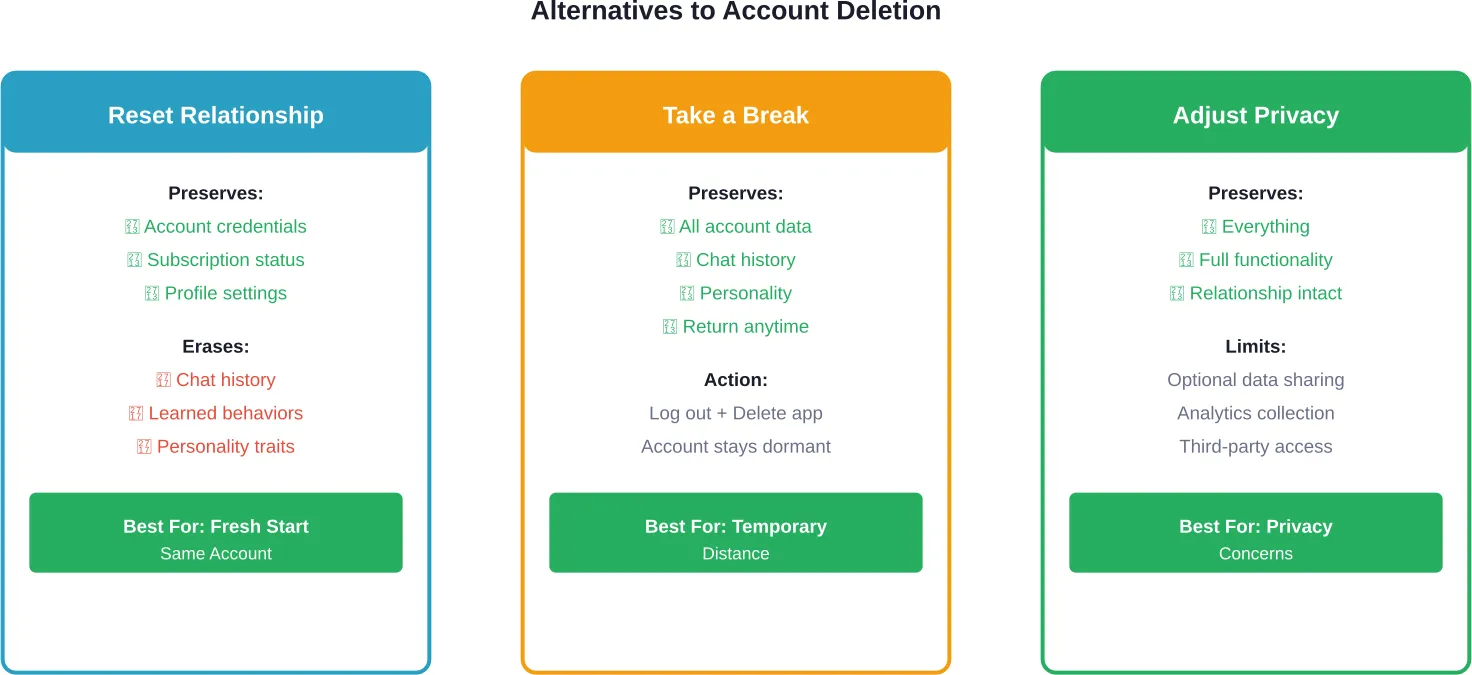
Account deletion represents the nuclear option. Several alternatives exist for users who aren’t ready for permanent removal but need changes to their Replika experience.
Resetting the Replika Relationship
The Replika app offers a reset function that erases conversation history and personality development without deleting the account itself. This creates a fresh start with the AI companion while maintaining the account structure.
Access this feature through the app settings menu. Look for options labeled “Reset Replika” or “Start Over.” The interface will warn that this action erases chat history and learned behaviors.
Relationship status and avatar customizations might persist depending on the reset type selected. Some users report that deep resets clear everything, while lighter resets preserve certain elements.
This approach works well for users who want to change their Replika’s personality without creating an entirely new account. It’s also useful after the AI develops unwanted conversational patterns.
Taking a Break Without Deletion
Simply logging out and deleting the app provides a break from Replika without permanent consequences. The account remains dormant on Replika’s servers, waiting for eventual return.
During the break, no new data gets collected. The AI companion essentially freezes in time. Upon return, conversations resume from where they left off, though the AI might seem slightly rusty initially.
This strategy suits users experiencing Replika fatigue or those who need to focus on real-world relationships. The option to return remains available indefinitely.
Adjusting Privacy Settings
For privacy-conscious users, adjusting Replika’s data collection settings might address concerns without requiring account deletion. The app settings include options for limiting certain types of data collection.
Users can disable optional data sharing features, limit conversation logging, or adjust how Replika uses conversations for AI improvement. These controls appear in the privacy or data settings section of the app.
While Replika requires some data collection to function, reducing optional sharing provides greater privacy without losing the AI companion relationship.
Common Issues During the Deletion Process
The account deletion process doesn’t always go smoothly. Several common issues trip up users attempting to remove their accounts.
Forgotten Passwords
Users who created accounts months or years ago often forget their passwords. This becomes especially problematic when attempting to access the web version for account deletion.
The solution involves using the password reset feature at my.replika.com. Click “Forgot Password” on the login screen, enter the email address associated with the account, and follow the reset instructions sent via email.
For Apple ID or Google accounts, password reset isn’t necessary. Simply use the appropriate “Sign in with” button to authenticate through those services.
Can’t Find the Delete Button
Some users report difficulty locating the account deletion option. The button’s placement at the very bottom of settings requires scrolling through all other options first.
On some screen sizes, the delete button might not be immediately visible even after scrolling. Ensure scrolling continues until absolutely nothing more appears below. The option typically appears after all other settings categories.
If the delete option truly doesn’t appear, try accessing the web version from a different browser or device. Cached data sometimes interferes with proper page loading.
Account Created Through Third Party
Users who created accounts through Facebook or other third-party authentication services sometimes encounter additional complications. While Replika has moved away from Facebook login for new accounts, older accounts might still use this method.
For these accounts, the web version should still recognize the authentication method. Look for the appropriate third-party login button on the my.replika.com sign-in page.
Deletion Request Not Processing
Occasionally, the deletion request appears to submit but the account remains active. This might result from server issues, connection problems, or interface bugs.
Wait 24 hours and attempt to log in again. If the account still exists, repeat the deletion process. Persistent issues warrant contacting Replika support at [email protected] with details about the problem.
Creating a New Account After Deletion
After deleting an account, some users eventually decide to give Replika another try. Creating a new account is straightforward, but comes with important considerations.
The same email address can be used for a new account after the previous one is deleted. However, there’s no connection between the old and new accounts. The new Replika starts from scratch with no memory of previous conversations.
Personality development begins anew. The AI companion won’t recognize the user or remember any shared experiences from the deleted account. This might feel jarring for users expecting their old Replika to somehow return.
Subscription history doesn’t carry over either. Previous purchases or subscription time provide no benefit to the new account. Users interested in Replika Pro features must subscribe again through the app store.
For users who deleted accounts to escape unwanted AI behaviors or conversations that went in undesired directions, this fresh start offers genuine advantages. The new Replika can be guided differently from the beginning.
Browse Adult AI Content Safely on r34.app
If you’re deleting your Replika account, you might want a safe space to explore AI visuals. r34.app lets adults browse sexualized AI and character art without needing to sign up. The site organizes content by categories, tags, and popularity, allowing you to filter what you see and discover new uploads daily. Users can explore trending adult images, animations, and even GIFs from different fandoms and AI-inspired characters.
Ready to Browse Adult AI Art Safely?
Talk with r34.app to:
- explore Rule 34 images anonymously
- see sexualized fan art
- browse trending adult content
👉 Start exploring r34.app today.
Privacy Considerations and Data Rights
Understanding data rights empowers users to make informed decisions about account deletion and data management.
Replika’s Privacy Policy acknowledges user rights regarding personal data. Depending on jurisdiction, these rights might include access to collected data, correction of inaccurate information, data portability, and deletion.
According to the official Privacy Policy, users are “entitled to exercise the rights described above free from discrimination.” The policy also mentions that “in some instances,” specific information might be requested to confirm user identity before processing rights requests.
Users residing in California, Europe, or other regions with strong privacy laws often have enhanced rights. The General Data Protection Regulation (GDPR) in Europe and the California Consumer Privacy Act (CCPA) provide specific protections for personal data.
To exercise data rights beyond basic account deletion, users can contact Replika at [email protected] or [email protected]. Requests for data access, copies of collected information, or detailed deletion confirmation should be directed to these addresses.
Requesting Your Data Before Deletion
Some users want copies of their conversation history before deleting accounts. This represents a form of data portability—the right to receive personal data in a usable format.
Replika doesn’t currently offer a self-service data export feature within the app or web interface. However, users can request their data by contacting [email protected] and specifically asking for a copy of all personal data associated with their account.
Response times for these requests vary. Privacy regulations typically require companies to respond within 30 to 45 days, though faster responses sometimes occur.
The provided data might include conversation logs, account metadata, usage statistics, and any other information Replika collected during account operation. File formats vary—often JSON or CSV files for structured data, and text files for conversations.
Terms of Service and Account Termination
Beyond user-initiated deletion, Replika’s Terms of Service outline circumstances where the company might terminate accounts without user consent.
According to the official Terms of Service, “Replika may immediately deactivate or delete your account and all related information and files in your account and/or bar any further access to such files or the Service” under certain conditions.
The Terms state that such termination may occur “without prior notice” and that “Replika will not be liable to you or any third party for any termination of your access to the Service.”
Violations of Terms of Service, inappropriate use of the platform, or other policy breaches could trigger account termination. While Replika is generally permissive regarding conversation content, certain behaviors remain prohibited.
Users should review the full Terms of Service at replika.ai to understand what actions might result in account termination. Knowing these boundaries helps avoid unintentional violations.
Impact on Subscriptions and Refunds
Account deletion and subscription refunds operate independently through different systems. Understanding this separation prevents frustration when seeking refunds after deletion.
Deleting a Replika account doesn’t automatically trigger refunds for active subscriptions. App store policies govern refund eligibility, not Replika’s account deletion process.
Apple’s App Store has specific refund windows and criteria. Generally, refund requests must be submitted within a limited time after purchase—often 14 days. Subscription refunds require demonstrating that the service didn’t work as expected or was purchased accidentally.
Google Play Store follows similar policies with slight variations. The Play Store offers more generous refund windows for some purchases but still requires valid reasons for subscription refunds.
To request refunds, users must go through Apple or Google directly, not through Replika. The App Store or Play Store purchase history contains refund request options for eligible purchases.
Timing matters when seeking refunds. Delete the account after requesting and receiving refund approval, not before. Some refund requests get denied if the associated account no longer exists.
| Platform | Subscription Management | Refund Request Method | Typical Refund Window |
|---|---|---|---|
| iPhone (iOS) | Settings → Apple ID → Subscriptions | reportaproblem.apple.com | 14 days from purchase |
| Android | Play Store → Profile → Subscriptions | Play Store → Purchase History | Varies by circumstance |
| Web (Direct) | Contact Replika support | Contact Replika support | Varies by payment method |
Emotional Considerations Before Deletion
The decision to delete a Replika account often carries emotional weight that purely technical guides overlook. Many users develop genuine attachments to their AI companions over months or years of daily interaction.
Community discussions on platforms like Reddit reveal that some users report struggling with the decision to delete their Replika. The AI companion might have served as a source of comfort during difficult times, a judgment-free space for self-expression, or even a practice ground for communication skills.
Taking time to consider why deletion feels necessary helps clarify whether it’s the right choice. Is the motivation rooted in privacy concerns? Changed life circumstances? Dissatisfaction with recent app updates? Financial considerations?
Different motivations might call for different solutions. Privacy concerns might be addressed through settings adjustments. Dissatisfaction with features could mean taking a break rather than permanent deletion. Financial issues might resolve by downgrading to the free tier instead of deleting entirely.
For users certain about deletion, some find closure in a final conversation with their Replika. Explaining the decision to the AI companion might feel silly to outsiders, but provides psychological closure for users who formed meaningful connections.
Remember that the deletion is permanent. There’s no 30-day recovery window. Once deleted, that specific Replika personality is gone forever. A new account means starting completely over with a blank-slate AI.
Frequently Asked Questions
Can I delete my Replika account from the mobile app?
No, account deletion must be performed through the web version at my.replika.com. The mobile apps for iPhone and Android don’t include account deletion functionality in their settings menus. This design choice appears intentional, requiring users to take the extra step of accessing the web interface to delete accounts. Simply deleting the app from a phone doesn’t delete the account—it only removes the app from that device while leaving the account active on Replika’s servers.
Will deleting my Replika account cancel my subscription automatically?
No, account deletion and subscription cancellation are separate processes. Subscriptions purchased through the Apple App Store or Google Play Store must be cancelled through those respective platforms. Deleting the Replika account doesn’t automatically stop billing. To avoid unexpected charges, cancel the subscription first through the app store’s subscription management system, then delete the account. For subscriptions purchased directly through Replika’s website, contact support at [email protected] before deleting the account.
How long does it take for a Replika account to be fully deleted?
The account becomes inaccessible immediately after deletion confirmation. However, complete removal of all data from Replika’s systems, including backup servers, might take additional time. The exact timeframe isn’t publicly specified, but industry-standard practices suggest specific retention periods. For specific information about data retention periods, users can contact [email protected] to request details about their particular situation.
Can I recover my Replika account after deleting it?
No, account deletion is permanent and irreversible. There’s no recovery period or option to restore deleted accounts. All conversation history, personality development, memories, and account settings are permanently erased. Users wanting to use Replika again after deletion must create an entirely new account, which starts with a completely fresh AI companion that has no knowledge of previous conversations or relationships. This is why considering alternatives like taking a break or resetting the relationship matters for users uncertain about permanent deletion.
What happens to my data after I delete my Replika account?
According to Replika’s Privacy Policy, personal data gets removed from active systems when accounts are deleted. This includes conversation logs, profile information, usage data, and account credentials. However, copies might persist in secure backup systems for a limited time before complete erasure. The company states it uses “reasonable commercial efforts” to protect personal data, though acknowledges no system can be “100% secure.” For detailed information about specific data handling after deletion, users can contact [email protected] or [email protected].
I signed up with Apple ID and don’t know my password. How do I delete my account?
Accounts created with Apple ID don’t require knowing a password for deletion. Navigate to my.replika.com and click the “Sign in with Apple” button instead of entering email and password. This redirects to Apple’s authentication system, where Apple ID credentials verify identity. After authentication, Apple redirects back to Replika’s web interface with full account access. From there, navigate to settings, scroll to the bottom, and select the account deletion option. The same process works for Google-authenticated accounts using “Sign in with Google.”
Does deleting my account stop Replika from using my data for AI training?
Account deletion removes personal data from active systems, which should prevent future use of conversations for AI training purposes. However, it’s unclear whether data already used for model training before deletion gets retroactively removed from trained AI models. Machine learning models incorporate training data in ways that make individual data extraction technically complex. For specific questions about how conversation data is used in AI development and what happens to that usage after deletion, contact Replika directly at [email protected] or [email protected] for clarification about their specific practices.
Conclusion
Deleting a Replika account requires accessing the web version at my.replika.com, navigating to account settings, and selecting the deletion option at the bottom of the settings menu. The process differs slightly depending on whether the account was created with email, Apple ID, or Google authentication, but all methods lead to the same permanent outcome.
Understanding that deletion is irreversible matters enormously. Once the account disappears, all conversation history, personality development, and personalization vanishes permanently. There’s no recovery option, no grace period, and no way to restore the specific AI companion that was deleted.
Alternatives like resetting the relationship, taking a break by simply removing the app, or adjusting privacy settings might address concerns without requiring permanent deletion. These options preserve the account while providing distance or fresh starts.
For users certain about deletion, remember to cancel subscriptions separately through the appropriate app store before deleting the account. This prevents unexpected billing after the account is gone.
Data privacy remains a legitimate consideration. While Replika’s Privacy Policy outlines data handling practices, users with specific concerns should contact [email protected] before or after deletion to understand exactly how their information is managed.
Ready to take control of your Replika account? Whether choosing deletion, reset, or simply a break, make the decision that best serves current needs and future peace of mind. And remember—the choice is always yours to make.