
Quick Summary: To cancel your SoulGen AI subscription, log into your account at www.soulgen.ai, access the Feedback Form, and submit a refund request to terminate automatic renewal. Cancellation stops future billing but does not refund already-paid subscription fees. According to the official website, you’ll retain premium features until the current billing period ends.
SoulGen AI has become a popular platform for generating AI-powered images and videos, but sometimes you need to cancel a subscription. Maybe the $12.99 monthly fee doesn’t fit your budget anymore, or you’ve finished your project.
Whatever the reason, understanding how to properly cancel your SoulGen subscription matters. Get it wrong, and you might face unexpected charges.
This guide walks through the official cancellation process, refund policy, and common mistakes to avoid. Everything here comes directly from SoulGen’s official documentation.
What Is SoulGen AI and Its Subscription Model?
SoulGen is an online AI content creation application that uses artificial intelligence algorithms to generate unique images and videos. The platform launched SoulGen 2.0 in November 2025, introducing significant improvements in video generation technology.
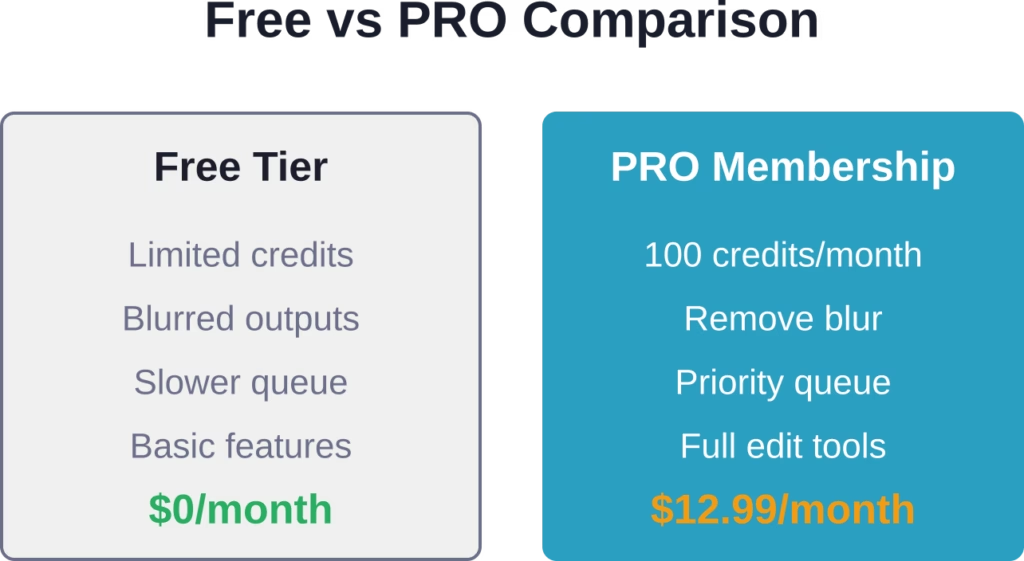
The PRO membership service costs $12.99 per month and operates on a monthly billing cycle. According to the official subscription terms, here’s what PRO members get:
- Remove blur from generated content
- Priority queue access
- Unlock multitask capabilities
- Multi-creations create feature
- Edit image functionality
- 100 credits per month
The subscription automatically renews at the end of each billing cycle under the exact same conditions unless you take action to cancel it. That’s the critical part many users miss.
Explore NSFW Content Browsing With R34.app
AI image tools often focus on subscriptions, credits, and content generation. R34.app works differently, focusing on browsing NSFW content through tags rather than creating new images.
Looking for a Different Type of Platform?
R34.app includes:
- searches by character or fandom
- tag-based content organization
- browsing across multiple sources from one interface
👉 Visit R34.app to explore its tag-based browsing system.
Understanding SoulGen’s Automatic Renewal Terms
Here’s the thing though—SoulGen subscriptions renew automatically. The platform requires a valid payment method (credit card) to process payments, and billing happens without additional confirmation.
This means if you forget about your subscription, you’ll keep getting charged $12.99 every month. This automatic renewal structure is a common consideration for subscription platforms.
The automatic renewal continues indefinitely until you actively terminate it through the proper channels. Setting a calendar reminder for a few days before your next billing date can prevent unwanted charges.
Step-by-Step: How to Cancel Your SoulGen Subscription
The official cancellation process is straightforward but specific. Follow these exact steps based on SoulGen’s terminating automatic renewal documentation:
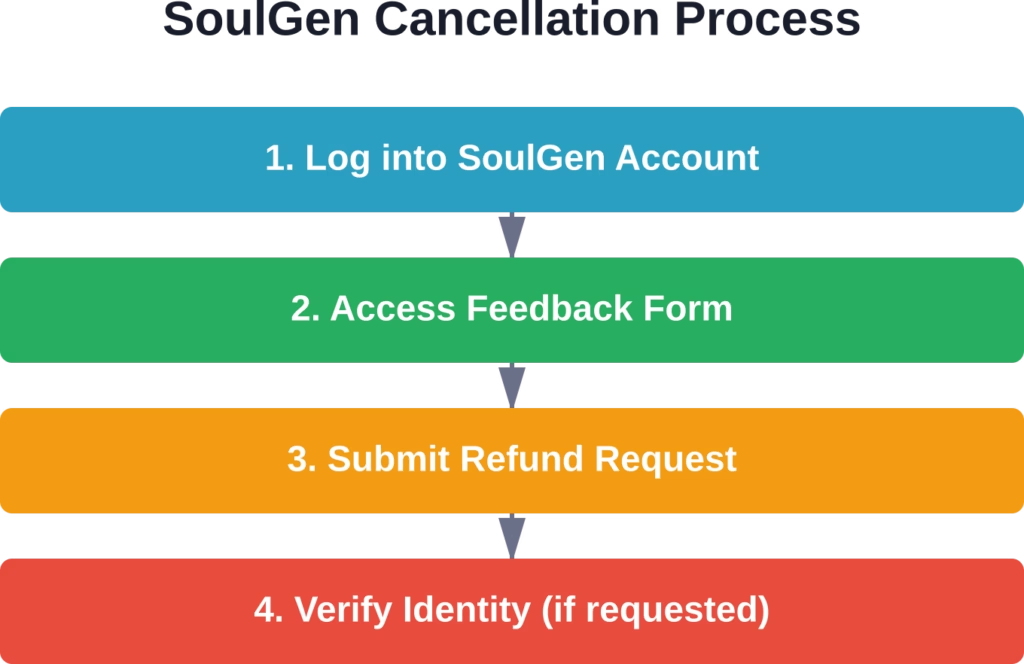
Step 1: Log Into Your SoulGen Account
Navigate to www.soulgen.ai and sign in using your registered credentials. You can’t cancel through third-party payment processors or app stores—cancellation must happen directly through SoulGen’s platform.
Step 2: Locate the Feedback Form
Once logged in, find the Feedback Form. This is the official channel for submitting cancellation requests. SoulGen may update the exact location of this form, so check their help documentation if you can’t locate it immediately.
Step 3: Submit a Refund Request
Through the Feedback Form, clearly state your intention to cancel and terminate automatic renewal. Use explicit language like “I want to cancel my SoulGen PRO subscription and stop automatic renewal.”
Being direct prevents misunderstandings and ensures your request gets processed correctly.
Step 4: Provide Identity Verification
SoulGen may request specific information to verify your identity. This is a security measure to protect your account. Respond promptly with the requested details to avoid processing delays.
Critical Refund Policy Details You Must Know
Now, this is where it gets tricky. Canceling your subscription and getting a refund are two different things.
According to the official return policy, terminating your subscription will not result in a refund for any subscription fees already paid. The policy is clear on this point.
That said, there’s one exception. If you stop using SoulGen but forget to unsubscribe, the platform will usually refund your latest subscription payment—but only under these strict conditions:
- You have not used any credits since the payment was completed
- You have not created any images since the payment was completed
- The request is for the most recent payment only
Real talk: this means if you generated even one image after your billing date, you’re likely not getting a refund. The policy protects against users consuming the service and then requesting their money back.
| Scenario | Refund Eligible? | Notes |
|---|---|---|
| Forgot to cancel, used no credits/images | Yes | Latest payment only |
| Forgot to cancel, created 1+ images | No | Service was consumed |
| Want refund for previous months | No | Only latest payment considered |
| Canceling mid-cycle, no usage | No | Keep access until cycle ends |
What Happens After You Cancel?
Once your cancellation request is processed, automatic renewal stops. Future billing cycles won’t charge your payment method.
But here’s what many users don’t realize: you retain full access to premium features until your current billing period concludes. If you cancel on June 10 and your billing cycle ends June 30, you can still use PRO features through June 30.
This is actually fair—you paid for the full month, so you get the full month. Just don’t expect immediate loss of access to signal successful cancellation.
Common Cancellation Mistakes to Avoid
Based on common subscription management patterns, here are mistakes that cause problems:
Deleting Your Account Instead of Canceling
Deleting your account doesn’t automatically cancel billing. The subscription and account management are separate systems. Always cancel the subscription first, then delete your account if desired.
Assuming Email Requests Work
The official process requires using the Feedback Form. Sending an email to support might work, but it’s not the documented method and could delay processing.
Canceling Too Close to Billing Date
Processing takes time. If you submit a cancellation request the day before your billing date, the charge might still go through. Cancel at least 3-5 days before your next billing cycle for safety.
Not Confirming Cancellation
After submitting your request, watch for confirmation. Check your email and account status. If you don’t see confirmation within 48 hours, follow up through the Feedback Form again.
Alternatives to Full Cancellation
Sound familiar? You want to stop paying but might need SoulGen occasionally. Consider these options:
Cancel and use the free tier when needed. SoulGen offers limited functionality without a subscription. For occasional use, this might suffice.
Track your billing cycle and resubscribe only when you have active projects. Since you can cancel anytime and keep access through the billing period, you could subscribe for one month, complete your work, and cancel before renewal.
The platform doesn’t currently advertise pause or freeze options, so cancellation remains the only way to stop charges.
When Cancellation Makes Sense
Cancel your SoulGen subscription if any of these apply:
- You’ve completed your project and don’t need ongoing access
- The monthly cost doesn’t align with your usage frequency
- You found an alternative platform that better fits your needs
- You’re not using the 100 credits per month allocation
- Budget constraints require cutting subscription services
The short answer? If you’re not actively using the platform at least twice a month, you’re probably not getting value from the $12.99 fee.
Frequently Asked Questions
How long does SoulGen cancellation take to process?
Based on the official documentation, cancellation requests are processed after identity verification. Processing times aren’t explicitly stated, but community experiences suggest 24-48 hours for most requests. You’ll retain access to premium features until your current billing period ends regardless of when the cancellation processes.
Can I cancel SoulGen through the App Store or Google Play?
No. According to SoulGen’s official subscription terms, cancellation must happen directly through the SoulGen platform using the Feedback Form. If you subscribed through a mobile app store, you may need to manage subscription renewal there separately, but the official cancellation process requires going through SoulGen’s website.
Will I get a refund if I cancel my SoulGen subscription?
Generally speaking, no. The official return policy states that terminating your subscription will not result in a refund for already-paid fees. The only exception is if you forgot to unsubscribe and haven’t used any credits or created any images since your last payment—then SoulGen will usually refund that latest payment only.
What happens to my created images after canceling?
Practices vary across AI platforms regarding content retention after cancellation. Download any important creations before canceling to ensure you keep them.
Can I resubscribe to SoulGen after canceling?
Yes. Canceling your subscription doesn’t delete your account or prevent future resubscription. You can sign back up for PRO membership anytime at the current pricing rate. Your previous creations and account settings typically remain intact.
Does SoulGen offer annual subscriptions instead of monthly?
Yes, SoulGen offers a 12-month (annual) subscription plan priced at $90.99 per year (which breaks down to approximately $7.58 per month), alongside its monthly plan.
How do I know if my SoulGen cancellation was successful?
After submitting your cancellation request through the Feedback Form, watch for confirmation communication from SoulGen. Check your registered email and account settings. If automatic renewal is successfully terminated, your account should reflect this status. If you don’t see confirmation within 48 hours, submit a follow-up request.
Final Thoughts on Canceling SoulGen AI
Canceling your SoulGen AI subscription is straightforward when you follow the official process. Log into your account, access the Feedback Form, submit a refund request to terminate automatic renewal, and provide identity verification if requested.
Remember that cancellation stops future billing but doesn’t refund already-paid fees unless you meet the strict unused-credits exception. You’ll keep premium access through your current billing period.
The key is timing—cancel at least several days before your next billing date, confirm the cancellation processed, and download any important creations before your access changes.
Need to cancel? Head to www.soulgen.ai, log in, and start the process today. The sooner you submit your request, the sooner you’ll stop automatic renewal and take control of your subscription costs.