
Quick Summary: SoulGen is an AI tool that generates images and videos from text prompts. Users can create anime or realistic characters by describing features, then edit, animate, or swap faces using the platform’s built-in tools. Pricing starts with a free trial offering 2 to 5 credits, followed by paid plans at $12.99 per month or $90.99 per year. (Note: pricing may vary; verify current rates on soulgen.ai)
SoulGen AI has attracted 1.13 million monthly visits by November 2025, per Semrush, thanks to its ability to turn text into photorealistic or anime-style characters. The platform specializes in female portraits and offers editing, face swapping, and video creation—all from natural language prompts.
Here’s how to get started and make the most of its features.
Getting Started with SoulGen
Getting started with SoulGen is simple. Users can visit soulgen.ai, create an account, and choose between a limited free trial or one of the paid plans. The free trial usually includes 2 to 5 credits, which is enough to test the basic image generation process before paying.
The platform works through text prompts. Users type a description of the image they want, choose a visual style, and generate the result. SoulGen offers style options such as anime and realistic, so the output depends heavily on both the selected style and the details included in the prompt.
SoulGen uses a credit-based system. Each generated image costs one credit. This means the free tier is mainly useful for trying the tool, testing prompt quality, and seeing whether the results match the user’s expectations. Anyone planning to create images regularly will likely need a paid subscription.
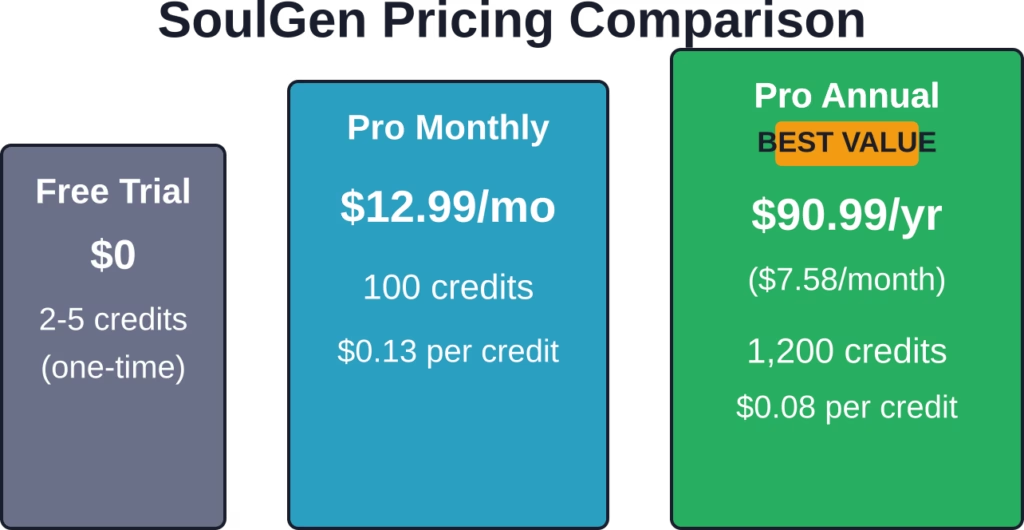
The monthly plan costs $12.99 and includes 100 credits. The yearly plan costs $90.99 and includes 1,200 credits, which works out to about $7.58 per month when averaged across the year. For occasional use, the monthly plan may be enough. For users who expect to generate images often, the annual plan offers more credits at a lower monthly average.
Explore NSFW Content Through Tags With R34.app
AI creation tools and content browsing platforms work differently. Rather than generating images, R34.app focuses on helping users find NSFW content through searchable tags and categories.
Looking for a Tag-Based Browsing Platform?
R34.app includes:
- searches by character, fandom, or keyword
- trending and popular content sections
- content organized across multiple sources from one interface
👉 Visit R34.app to explore its tag-based browsing system.
Writing Effective Prompts
SoulGen works best when the prompt gives it enough detail to follow. A short prompt may still create an image, but the result can feel vague or too generic. The more specific the description is, the easier it is for the tool to match the user’s idea.
For example, instead of writing “a woman,” a better prompt would be: “a woman with long red hair, green eyes, wearing a leather jacket, standing in a city at sunset.” This gives SoulGen clear details about the character, outfit, setting, and lighting.
Users can improve prompts by adding details such as:
- Hair color, hairstyle, eye color, and facial expression
- Clothing, accessories, and overall outfit style
- Pose, body position, or camera angle
- Background, location, and scene details
- Lighting, mood, and color palette
- Style tags such as anime, realistic, fantasy, cyberpunk, vintage, or cinematic
Tags can also help shape the final result. Keywords like fantasy, cyberpunk, vintage, soft lighting, or studio portrait guide the image toward a clearer aesthetic. For the best results, combine tags with full descriptions instead of relying on single words only.
A good prompt should feel like a short creative brief. It does not need to be complicated, but it should tell SoulGen what the subject looks like, where the scene takes place, and what kind of mood the image should have.
Using AI Magic Tools
Once an image is generated, SoulGen offers several editing options:
- Outpaint: Extend the canvas beyond the original frame to add background or change composition.
- Edit: Modify specific areas by describing what to change (e.g., “add sunglasses”).
- Face Swap: Upload a reference photo to make the AI character resemble someone specific.
- Video Creation: Turn static images into talking videos with lip-sync and natural motion, up to 20 seconds in HD (720p or 1080p).
These tools don’t require separate credits—they’re included in the subscription. That said, each edit or video generation consumes credits from the monthly or annual allowance.
Pricing Breakdown
SoulGen uses a credit-based system. Here’s how it works as of the latest data from Plisio:
| Plan | Price | Credits | Cost per Credit |
|---|---|---|---|
| Free Trial | $0 | 2-5 (one-time) | — |
| Pro Monthly | $12.99/month | 100 | $0.13 |
| Pro Annual | $90.99/year | 1,200 | $0.08 |
Pro subscribers can also buy additional credit packs. (Note: verify current top-up options and pricing on soulgen.ai) The annual plan offers a 70 percent discount compared to paying monthly for a full year.
Practical Tips
SoulGen works best when users give it a clear, detailed prompt. Generic descriptions usually lead to generic results, so it helps to guide the tool with specific visual details.
- Describe clothing, hairstyle, facial features, pose, and expression
- Add lighting details, such as soft light, studio lighting, sunset, or neon glow
- Include the mood of the image, such as calm, dramatic, playful, or cinematic
- Mention the background, setting, colors, and overall style
- Save strong prompts and reuse them when creating similar images
- For consistent characters, keep the same face, hair, outfit style, and core description
- Make small prompt changes instead of rewriting everything from scratch
- Expect better results from short video clips than longer ones
- Check video outputs carefully, as lip-sync and motion can still look uneven
- Use the free credits first to test prompt quality before buying more credits
Frequently Asked Questions
How many credits does each action cost?
Generating an image costs one credit. Editing, outpainting, face swapping, and video creation each consume additional credits—typically one per operation, though complex edits may require more.