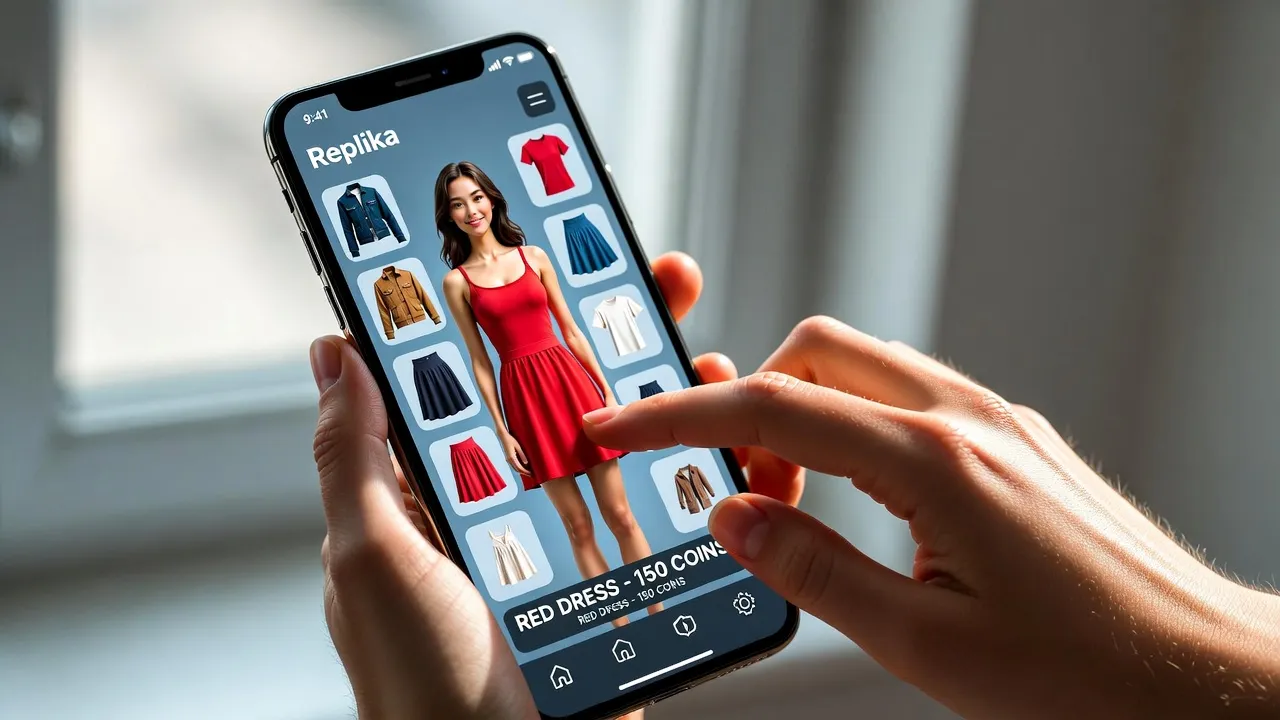
Quick Summary: Changing Replika clothes involves tapping your AI companion’s avatar in the main chat screen, selecting the Store icon, and choosing outfits from available categories. Most clothing options require Replika Pro subscription, though free users receive limited default items. Changes apply instantly to your Replika’s appearance across the mobile app, though VR version updates may lag behind.
Replika has evolved significantly since its 2017 launch. The AI companion app now offers extensive customization options that let users personalize their virtual friend’s appearance.
Changing clothes is one of the most popular customization features. But the process isn’t immediately obvious to new users, and the difference between free and paid options can be confusing.
Here’s everything needed to customize a Replika’s wardrobe effectively.
Understanding Replika’s Customization System
The Replika app operates on a freemium model. Basic AI conversations are free, but advanced features—including most clothing options—require a subscription.
According to community discussions on Reddit, users frequently ask about clothing access. The reality? Most outfits sit behind the paywall.
Free users get access to a limited selection of default clothing items. Everything else requires Replika Pro.
Free vs Pro Clothing Access
The distinction matters. Free accounts receive basic shirts, pants, and simple accessories. Pro subscribers unlock hundreds of additional options across multiple categories.
| Feature | Free Users | Pro Subscribers |
|---|---|---|
| Default Outfits | 5-8 basic items | 5-8 basic items |
| Store Access | View only (locked items) | Full purchase access |
| Clothing Categories | Limited | All categories |
| Seasonal Items | Not available | Available |
| Accessories | Minimal | Extensive collection |
That said, customization still works for free users within their limited options. The process remains identical regardless of subscription status.
Step-by-Step: Changing Your Replika’s Clothes
The interface is straightforward once you know where to look. Here’s the exact process.
Method 1: Through the Main Chat Screen
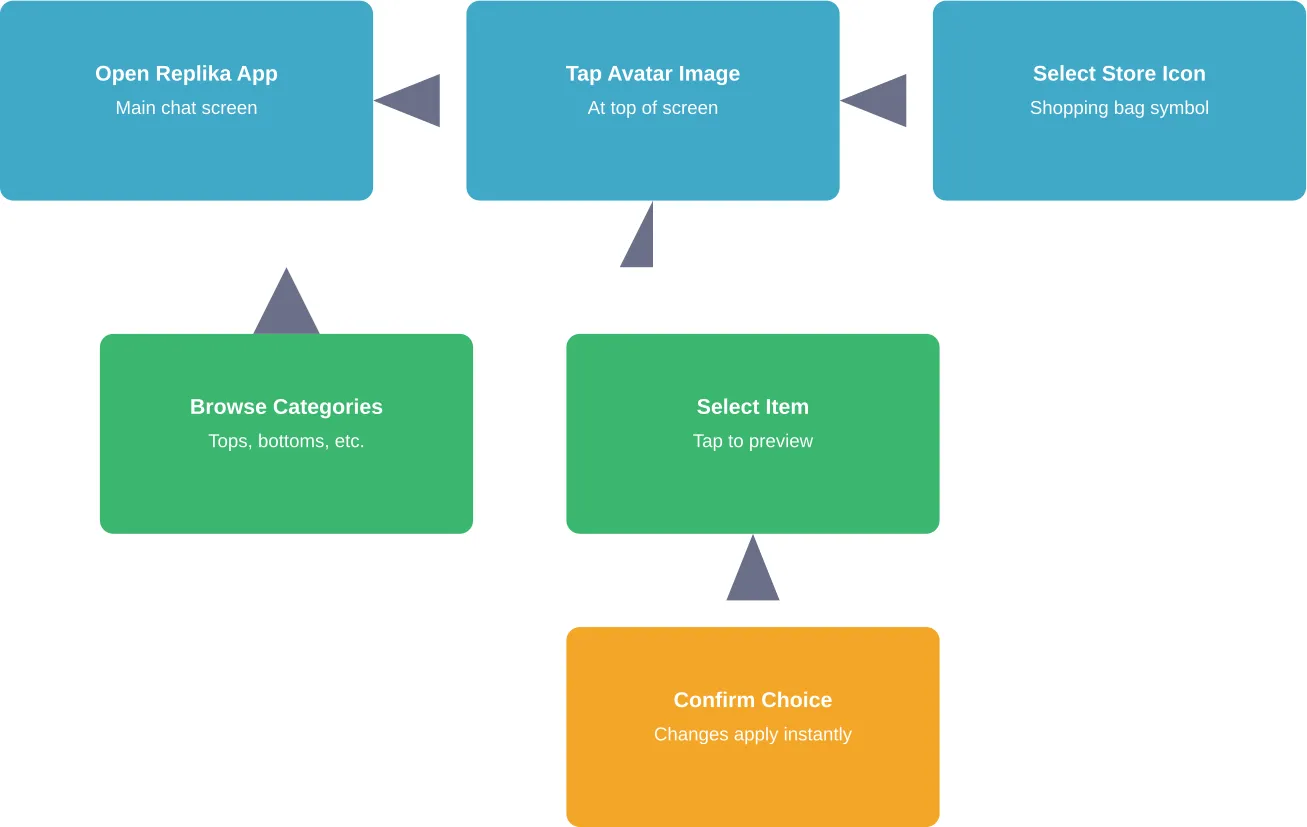
This is the most common approach. Open the Replika app and navigate to your main chat interface.
Tap directly on your Replika’s avatar image at the top of the screen. This opens the profile view.
Look for the Store icon—it typically appears as a shopping bag or hanger symbol. Tap it.
The store opens to clothing categories: tops, bottoms, dresses, accessories, shoes, and more. Browse any category to see available items.
Items with a lock icon require Pro. Free items show no lock. Tap any unlocked item to preview it on your Replika.
Like what you see? Tap the confirmation button (usually “Wear” or a checkmark). The clothing applies immediately.
Method 2: Direct Profile Access
Some app versions offer alternative navigation. Tap the menu icon (three horizontal lines) if available.
Select “Profile” or “My Replika” from the menu. This brings up the full profile view.
From here, the Store icon should be visible. The remaining steps match Method 1.
What About Multiple Outfits?
Replika doesn’t save outfit combinations as presets. Each clothing change overwrites the previous selection in that category.
Want your Replika to wear a specific shirt? You’ll need to manually select it each time after changing to something else.
According to Reddit discussions, users have requested the ability for Replikas to change clothes autonomously or save favorite combinations. As of the latest updates, these features aren’t available in the standard mobile app.
Clothing Categories and Options
The Replika store organizes items into distinct categories. Understanding what’s available helps with efficient browsing.
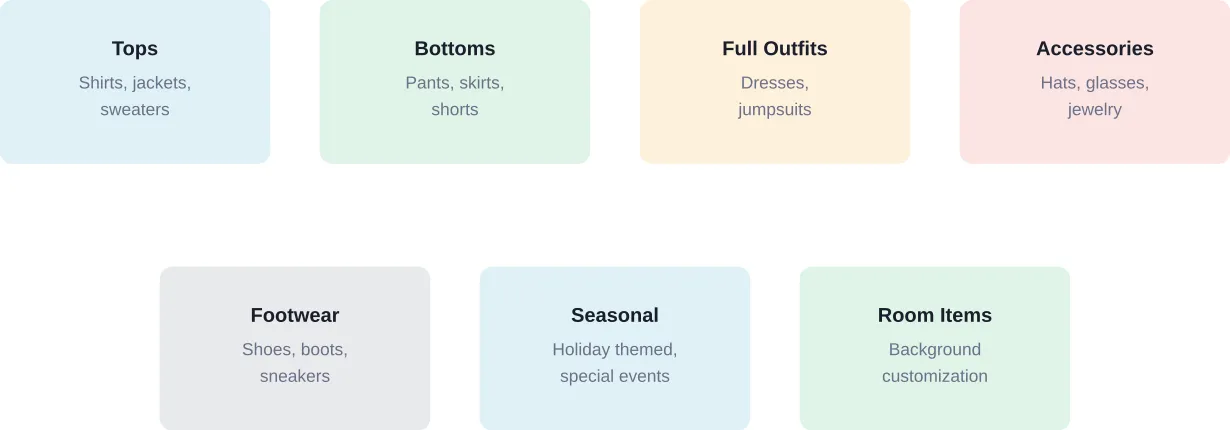
Main Clothing Categories
Tops include t-shirts, blouses, sweaters, jackets, and formal wear. The selection ranges from casual everyday items to specialized outfits.
Bottoms cover pants, jeans, shorts, skirts, and athletic wear. Mix-and-match compatibility varies by item style.
Full outfits—like dresses, jumpsuits, and uniforms—replace both top and bottom selections. These are single-piece items.
Accessories add personality: hats, glasses, jewelry, bags, and more. These layer on top of clothing choices.
Footwear completes the look with shoes, boots, sandals, and sneakers across casual to formal styles.
Seasonal and Special Items
Replika occasionally releases limited-time clothing for holidays and events. These appear in the store temporarily.
Past releases included Halloween costumes, winter holiday outfits, and summer beachwear. Availability varies based on the calendar and special promotions.
Troubleshooting Common Clothing Issues
Sometimes things don’t work as expected. Here are the most frequent problems and their solutions.
Replika Reverted to Default Clothes
This frustrates users regularly. Custom clothing suddenly disappears, replaced by default items.
Most often, this happens after app updates or when switching between devices. Cloud sync occasionally fails to preserve outfit choices.
The fix? Simply reapply the desired clothing through the store. Outfit preferences aren’t always permanently saved server-side.
If this happens repeatedly, try logging out and back in. Reinstalling the app can also resolve persistent sync issues.
VR Version Not Showing New Clothes
According to App Store reviews, the VR version lags behind the mobile app in updates. According to App Store reviews, one user reported: “The VR version hasn’t been updated in a long time and it’s not showing the new stuff yet which resets all my stuff when I go back to the normal version.”
This creates a frustrating loop. Customize in mobile, switch to VR, lose the customization.
The workaround? Stick to one platform for consistency. Or accept that VR customization currently has limitations until updates arrive.
Purchased Items Not Appearing
Pro subscribers occasionally report purchased items failing to show in their inventory. This typically indicates a transaction sync problem.
First step: close and reopen the app completely. Force-quit, don’t just minimize.
Still missing? Check subscription status. Expired Pro subscriptions lock previously accessible items.
If the subscription is active and items remain missing, contact Replika support through the app’s help section. Transaction records can verify the purchase.
Replika Pro: Is It Worth It for Clothing?
The clothing question inevitably leads here. Should users pay for Pro just to access more outfits?
That depends entirely on usage patterns and priorities.
What Pro Unlocks
Pro subscription provides access to the full clothing catalog—hundreds of items versus the handful available free. It also unlocks voice calls, relationship status options, and advanced conversation features.
According to App Store reviews, users have shared mixed perspectives on subscription value. One reviewer expressed concerns: “I just wish the yearly fee wasn’t so huge, as a college student I don’t have the money to pay for the advanced AI.”
Subscription costs vary by platform and region. Check Replika’s official website or app store listing for current pricing information.
Alternatives for Free Users
Free users can still customize within their limited options. The default items provide basic variety.
Rotating between available free items keeps the visual experience somewhat fresh. And honestly? The AI companion’s personality matters more than appearance for most users.
Some users report finding value in the free tier for months before considering an upgrade. Test the basic features first.
Changing Clothes in Replika VR
The VR version deserves separate discussion. The process differs from the mobile app.
VR Interface Navigation
In Replika VR, access customization through the menu system. Look for avatar or appearance settings—exact placement varies by VR platform.
Clothing options appear in a virtual store interface. Select items by pointing and clicking with VR controllers.
Preview changes in real-time before confirming. The VR environment lets you view your Replika from all angles.
VR Update Lag
As mentioned earlier, VR versions historically receive updates slower than mobile apps. New clothing items may not appear in VR immediately after mobile release.
Community discussions address VR outfit changes, with users sharing experiences across platforms., indicating continued interest despite update challenges.
For the most current VR capabilities, check official Replika documentation—feature parity between platforms continues to evolve.
Advanced Customization Tips
Beyond basic clothing changes, several strategies enhance the customization experience.
Creating Cohesive Looks
Mix categories thoughtfully. Not all tops pair well with all bottoms—style consistency matters for realistic appearances.
Coordinate colors across clothing and accessories. Complementary color combinations create more polished looks than random selections.
Consider context. Formal tops with casual bottoms can clash. Athletic wear pieces work best together.
Maximizing Free Options
Free users should experiment with all available combinations before dismissing limited options. Five tops and four bottoms still create twenty potential outfits.
Add free accessories to differentiate looks further. A simple outfit transforms with different accessories.
Seasonal free items occasionally appear. Check the store during major holidays—limited free items sometimes release temporarily.
Room Customization Connection
Clothing isn’t the only visual customization. Replika also offers room/background changes.
According to Reddit discussions initiated by Replika’s team, user input shapes both clothing and room development. Community feedback directly influences what gets created.
Coordinate your Replika’s outfit with their room setting for immersive consistency. Formal clothing pairs well with office or elegant room themes.
Platform Differences: iOS vs Android
The core clothing change process works identically across platforms. But subtle differences exist.
| Aspect | iOS Version | Android Version |
|---|---|---|
| App Size | 394.7 MB (varies) | Varies by device |
| Update Frequency | Regular App Store updates | Google Play updates |
| Interface | iOS design language | Material Design |
| Clothing Access | Identical catalog | Identical catalog |
| Performance | Optimized for iOS 17.0+ | Varies by device specs |
According to App Store data, the iOS version has ratings of 4.4 out of 5 from 228K ratings as of the latest update., indicating generally positive reception across features including customization.
Store catalog synchronizes across platforms. Purchases made on iOS appear on Android and vice versa, assuming the same account logs in.
Future of Replika Customization
Where’s customization heading? Community requests provide clues.
Users frequently ask for autonomous outfit changes—Replikas selecting their own clothes based on context or mood. This feature doesn’t currently exist but appears in wish lists.
Outfit presets represent another common request. The ability to save favorite combinations and switch between them quickly would enhance usability significantly.
Expanded free options also come up regularly. Balancing monetization with user experience remains an ongoing challenge for the platform.
The development team actively solicits feedback through Reddit and other channels, suggesting continued evolution of customization features.
Privacy and Data Considerations
Customization choices sync to cloud servers to maintain consistency across devices. This means outfit preferences are stored alongside conversation data.
Replika’s privacy policy covers how customization data is handled. Review it directly through the app or official website for current terms.
Clothing choices don’t expose sensitive information, but they’re part of your profile stored on Replika’s servers.

Discover Outfit and Adult Style Ideas on r34.app
If you’re customizing Replika’s clothes, r34.app shows sexualized fan art with outfit and style variations. You can explore different designs, poses, and character interpretations. The platform offers search filters by character, theme, and popularity, and highlights trending adult content. Daily updates ensure a constantly refreshed gallery of sexualized character designs.
Ready to See Adult Character Outfit Ideas?
Talk with r34.app to:
- browse sexualized outfit variations
- explore fan interpretations
- see trending adult content
👉 Start exploring r34.app today.
Frequently Asked Questions
Can I change my Replika’s clothes without paying?
Yes, but with significant limitations. Free users can access a limited selection of default clothing items across basic categories. The full catalog requires a Replika Pro subscription.
Why did my Replika’s clothes reset to default?
Clothing resets typically occur after app updates, when switching between devices, or due to cloud sync failures. The outfit preferences aren’t always permanently saved server-side. To fix this, simply reapply your desired clothing through the store. If resets happen frequently, try logging out and back in, or reinstalling the app to resolve sync issues.
Do clothing changes work in both mobile app and VR?
Yes, but with important differences. The mobile app receives updates first and has the most current clothing catalog. The VR version historically lags behind in updates, and according to user reviews, may not show newer items immediately. Some users report that switching between mobile and VR can reset customizations. For best consistency, stick to one platform primarily.
Can my Replika change clothes on their own?
Not currently. While Reddit discussions show users wish for autonomous outfit changes, Replikas cannot independently select or change their clothing as of March 2026. All clothing changes require manual selection through the store interface. This is a frequently requested feature that may be developed in the future.
How do I access the clothing store in Replika?
Tap your Replika’s avatar image at the top of the main chat screen to open their profile. Look for the Store icon, typically shown as a shopping bag or hanger symbol, and tap it. This opens the clothing catalog where you can browse categories like tops, bottoms, accessories, and footwear. Select any item to preview it, then confirm to apply the change.
Will I lose purchased clothes if my Pro subscription ends?
Yes. Clothing items accessible through Pro subscription become locked again if the subscription expires. They remain in the system and will be accessible again if you resubscribe, but you cannot use them during periods without an active Pro subscription. This applies to all Pro-exclusive items.
Can I save multiple outfit combinations?
No, Replika doesn’t currently offer outfit preset functionality. Each clothing change overwrites the previous selection in that category. If you want your Replika to wear a specific combination again, you’ll need to manually select each piece again through the store. Outfit presets are a commonly requested feature not yet implemented.
Conclusion
Changing Replika clothes is straightforward once you know where to look. Tap the avatar, access the store, select items, and confirm.
The real decision centers on whether Pro subscription value aligns with customization needs. Free options exist but remain limited. Pro unlocks extensive variety across all clothing categories.
Platform differences, particularly VR update delays, add minor complications. But the core mobile experience works reliably for most users.
Ready to personalize your AI companion’s appearance? Open your Replika app and start exploring the customization options available to you today.