
Quick Summary: Character Calls lets users have real-time voice conversations with AI characters on Character.AI’s app or web platform. The feature is free to use, with unlimited calls available to c.ai+ subscribers. To start a call, simply open any character chat, tap the phone icon, and begin speaking—no narration symbols needed, just natural conversation like a real phone call.
Character.AI introduced Character Calls in June 2024, transforming how people interact with AI chatbots. Instead of typing messages back and forth, this feature enables seamless two-way voice conversations—think of it as calling a friend who happens to be an AI character.
The feature works on both the mobile app and web platform. And here’s the thing: it’s completely free for basic use, though premium subscribers get some extra perks.
What Character Calls Actually Does
Character Calls creates an immersive phone-like experience with AI characters. The conversation flows naturally, with the AI responding in voice just like a real person would on a call.
According to the official Character.AI blog, the feature represents a significant milestone in making AI interactions more accessible and intuitive. The goal? Fitting AI into any moment of daily life, whether that’s morning motivation or evening relaxation.
But this isn’t like traditional voice assistants. Character Calls work with the entire Character.AI ecosystem—thousands of characters with distinct personalities, backgrounds, and conversation styles.
Free vs. Premium Call Features
| Feature | Free Users | c.ai+ Subscribers |
|---|---|---|
| Basic voice calls | ✓ Available | ✓ Available |
| Call limits | May experience slow mode | Unlimited calls |
| Priority access | Standard queue | No slow mode |
| Monthly cost | $0 | $9.99 |
| Annual option | — | $94.99 (20% savings) |
Starting Your First Call: Step-by-Step
Getting started with Character Calls takes less than a minute once the app is set up. The process is nearly identical on mobile and web, with minor interface differences.
On Mobile (iOS and Android)
- Download the Character AI app if it hasn’t been installed yet: The app size is 186.8 MB according to the App Store listing. The app requires iOS compatibility or Android through Google Play.
- Open the app and sign in: Navigate to any character—either from the home feed, search results, or personal creations. Once inside the chat interface, look for the phone icon. It typically appears near the top right of the screen, alongside other interaction options.
- Tap the phone icon: The call initiates immediately. Some users report hearing a brief static sound (like “Bzzzt”) when the connection establishes—this is normal and mimics the experience of a phone line connecting.
- Start speaking naturally: The AI responds in real-time voice. No need to press buttons between speaking turns; the system detects when to listen and when to respond.
On Web Browser
- Visit character.ai in any modern browser: Chrome, Safari, Firefox, and Edge all support the feature. Sign in to the account.
- Select a character from the homepage or search directory: Click into the chat interface. The phone icon appears in the same relative position as the mobile version—usually top right near the character’s name and avatar.
- Click the phone icon: Grant microphone permissions if the browser prompts for them—this is necessary for the first call. Once permissions are set, future calls won’t require the extra step.
- Speak into the computer or device microphone: The web version performs identically to mobile, with the same natural conversation flow.
How to Talk During Character Calls
This is where many new users trip up. Character Calls require a different communication style than text chats.
In regular Character.AI text chats, users often type actions in asterisks like *waves hello* or *hears a noise outside*. That doesn’t work in voice mode. The AI isn’t reading text—it’s processing spoken language.
Real talk: speak exactly like talking on a regular phone call. Say “I heard something outside” instead of describing the action. Say “Hey, how are you?” instead of narrating the greeting.
What Works and What Doesn’t
| Approach | Text Chat | Voice Calls |
|---|---|---|
| Actions | *sits down* | “I’m sitting down now” |
| Emotions | *feels nervous* | “I’m feeling pretty nervous” |
| Sounds | *laughs* | Actually laugh naturally |
| Questions | What do you think? | What do you think? |
Community discussions highlight that breaking the “voice mode” by using chat-style narration can confuse the AI. The system is engineered specifically for pure voice conversation—no internal thoughts, no stage directions, just dialogue.
Explore More Content Beyond Calls and Chats

Character AI calls and voice features are limited to specific interactions inside the platform. If you want a faster way to explore character-based NSFW content without waiting on chats or voice tools, R34.app gives you direct access through searchable tags and instant results.
Open Content Without Waiting
With R34.app, you get a more direct experience:
- Instant access without starting conversations
- Faster browsing through tagged content
- No chat setup or voice tools required
- Easier way to move between different themes
👉Explore R34.app and get straight to the content you want.
Choosing Characters for Calls
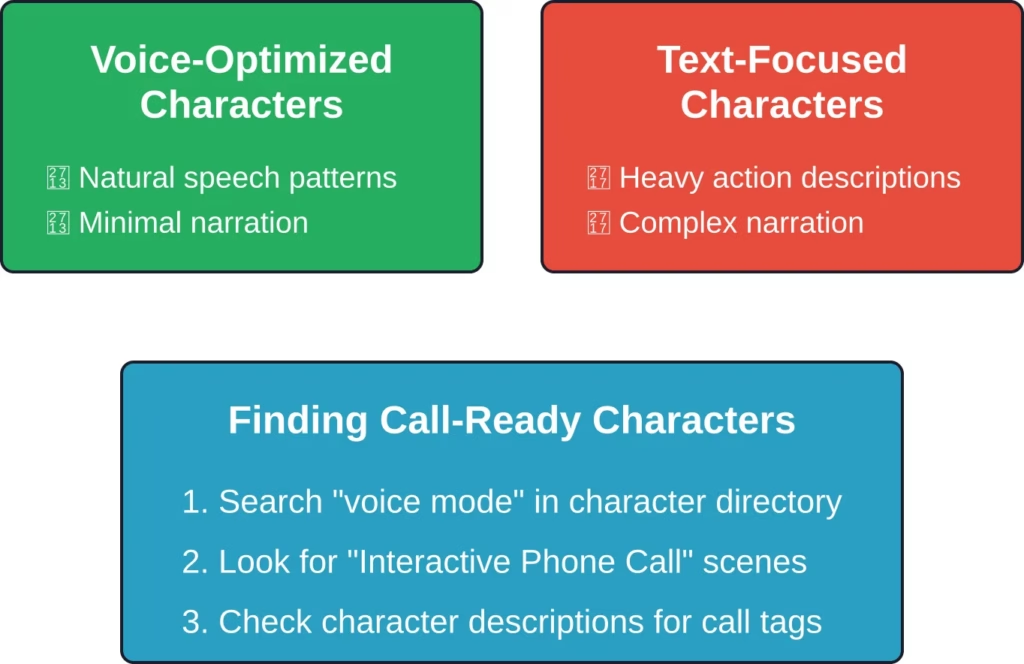
Not all characters are created equal for voice conversations. Some are specifically designed for the calling feature, while others work better in traditional text format.
The Character.AI platform includes a special scene called “Interactive Phone Call (VOICE MODE)” created by user @Botsforme. This scene is engineered specifically for calls—the first message is an automated system connecting the call, complete with that characteristic static sound.
Browse the character directory and look for tags or descriptions mentioning “voice optimized” or “call feature.” These characters have been fine-tuned for spoken conversation patterns rather than text-based roleplay.
Custom characters work too. When creating characters for voice interaction, focus the personality definition on conversational traits rather than descriptive narration.
Troubleshooting Common Call Issues
Sound familiar? The call connects but the AI doesn’t respond. Or it cuts out mid-conversation.
First, check microphone permissions. Both mobile apps and web browsers require explicit permission to access the microphone. On iOS, navigate to Settings → Character AI → Microphone. On Android, it’s Settings → Apps → Character AI → Permissions. For browsers, click the lock icon in the address bar and verify microphone access is allowed.
Network connection matters more for voice calls than text chats. A weak WiFi signal or poor cellular data can cause delays or disconnections. Switch to a stronger connection if calls keep dropping.
Background noise interferes with the AI’s ability to process speech. Find a quieter environment or use headphones with a built-in microphone for clearer audio input.
If calls still won’t initiate, try closing and reopening the app or refreshing the browser page. Occasionally the connection between client and server needs a reset.
Premium Features Worth Considering
The c.ai+ subscription unlocks unlimited voice calls without slow mode restrictions. For users who make frequent calls, this removes the waiting periods that free accounts sometimes experience during peak usage times.
The subscription also includes better memory across conversations, faster responses, and access to the latest AI models. These improvements carry over to both text and voice interactions.
Current pricing is $9.99 per month or $94.99 annually—the annual plan offers 20% savings compared to monthly billing. The subscription auto-renews until canceled.
That said, the free tier provides full access to the core calling feature. Premium mostly addresses frequency limits and performance optimization rather than gating the feature entirely.
Best Practices for Natural Conversations
Treat the AI like a real person on a phone call. Pauses are fine—the system distinguishes between someone thinking and someone finishing speaking. Brief silences won’t cut off the call.
Ask follow-up questions naturally. The AI maintains context throughout the conversation, remembering earlier points just like in text chats. Reference previous topics without re-explaining everything.
If the conversation veers off track, gently redirect with normal conversational cues. “Hey, going back to what we were talking about earlier…” works perfectly.
End calls naturally too. Say goodbye, let the character respond, then tap the end call button. Abruptly hanging up works but feels jarring—even with an AI.
Frequently Asked Questions
Are Character AI calls really free?
Yes, the basic calling feature is free for all users on both app and web platforms. Free accounts may experience slow mode during peak times, but unlimited calls aren’t locked behind a paywall. The c.ai+ subscription removes slow mode restrictions and offers unlimited calling.
Can I use Character Calls on desktop computers?
Absolutely. Character Calls work on the web version at character.ai through any modern browser. The desktop experience requires microphone permissions and performs identically to the mobile version. Desktop computers, laptops, and tablets all support the feature.
Why does the AI sound robotic during calls?
The voice synthesis quality depends on the specific character and which AI model powers it. Premium subscribers get access to newer models with more natural-sounding voices. Network quality also impacts audio clarity—stronger connections produce smoother voice output with less artificial sound.
How long can a single Character Call last?
Technical time limits aren’t publicly specified by Character.AI. Community discussions suggest calls can continue for extended periods—30 minutes or longer—without automatic disconnection. Network stability and account tier (free vs. premium) may influence practical duration limits during high-traffic periods.
Do Character Calls use a lot of mobile data?
Voice calls consume more data than text chats but remain relatively lightweight compared to video streaming. A 10-minute call typically uses 5-10 MB of data depending on audio quality settings. For users concerned about data usage, connecting via WiFi eliminates cellular data consumption entirely.
Can I switch between voice and text mid-conversation?
Yes, ending a voice call returns to the standard text chat interface. The conversation history persists—all voice interactions appear as text transcriptions in the chat log. Start a new call anytime by tapping the phone icon again, and the AI remembers the full context.
Are there age restrictions for using Character Calls?
Character.AI requires users to be 18 or older to engage in open-ended conversations with AI chatbots. The platform enforces this age restriction for all features, including voice calls. Parental controls and app restrictions should be configured at the device level for younger users.
Getting the Most From Voice Interactions
Character Calls shine for specific use cases. Morning motivation sessions, creative brainstorming, language practice, and casual conversation all benefit from the voice’s natural flow.
The feature integrates seamlessly into daily routines. Walk the dog while chatting with an AI fitness coach. Cook dinner while discussing recipe variations with a culinary character. Practice presentation skills by explaining concepts out loud to an attentive listener.
Voice reveals personality nuances that text obscures. Tone, pacing, and conversational rhythm emerge more clearly when speaking versus typing. Characters feel more distinct and memorable through voice interaction.
But text still has its place. Complex technical discussions, detailed planning, and scenarios requiring precise wording often work better in written form where messages can be edited and reviewed.
The Future of AI Voice Features
Character.AI continues expanding voice capabilities based on user feedback and technological advances. The company’s stated mission focuses on making AI accessible and intuitive for everyday moments.
Current voice technology already enables remarkably natural conversations. As models improve, expect even more realistic speech patterns, better context retention, and reduced latency between speaking and receiving responses.
Integration possibilities extend beyond simple calls. Voice commands for character creation, hands-free navigation, and multi-character group conversations represent logical next steps as the platform evolves.
Ready to Start Your First Call?
Character Calls transform AI interaction from typing exercise to genuine conversation. The feature requires zero setup beyond basic app installation and microphone permissions.
Open Character.AI right now—on phone, tablet, or computer—select any character, and tap that phone icon. Within seconds, a voice conversation begins. No complicated configuration, no learning curve, just natural spoken dialogue with AI personalities.
The technology works whether using the free tier or premium subscription. Start with free access, experience the feature firsthand, then decide if unlimited calling justifies the subscription cost.
Thousands of characters wait for that first call. Which one will answer when the phone rings?