
Quick Summary: Deleting a Character AI account can be done directly through the platform’s settings menu. Both the website and mobile app have a built-in “Delete Account” / “Remove Account” option. You simply navigate to your profile settings, select the deletion option, and confirm by entering your username. No support ticket or email to [email protected] is required for standard account deletion. Once confirmed, account removal is typically processed quickly, though some data may be retained for legal and operational purposes.
Character AI has become one of the most popular AI chat platforms, attracting millions of users who create and interact with AI-powered characters. But sometimes the relationship runs its course.
Maybe privacy concerns are keeping you up at night. Or the platform isn’t delivering what you expected. Whatever the reason, deleting an account should be straightforward—except Character AI doesn’t exactly advertise a big red “Delete Account” button.
Here’s the thing though—account deletion on Character AI is actually simpler than it used to be. This guide walks through the complete process for both mobile and desktop users, explains what happens to personal data, and covers alternatives worth considering.
Why Users Consider Leaving Character AI
Before diving into deletion mechanics, understanding common exit motivations provides helpful context.
Privacy stands as the primary concern for many. Character Technologies, Inc. collects conversation data, user interactions, and behavioral patterns as outlined in their privacy policy last updated August 27, 2025 (per official source). According to the official website, certain information is required to provide the Services, and requesting deletion may result in inability to continue using the platform.
Content limitations frustrate another segment of users. The platform’s filtering systems restrict certain conversation types, pushing some toward alternatives offering fewer content guardrails.
Feature gaps also drive departures. Community discussions frequently mention desires for multi-character interactions, extended memory capabilities, and more sophisticated roleplay options that Character AI currently doesn’t support.
Cost considerations matter too. While Character AI offers free access, premium tiers introduce expenses that some find unjustified for the feature set delivered.
Understanding Data Retention Before Deletion
Real talk: deleting an account doesn’t instantly vaporize every trace of activity.
Character AI’s privacy policy specifies that the company retains certain information even after account deletion. Legal obligations, operational requirements, and dispute resolution needs justify this retention period.
Conversation logs, created characters, and interaction histories fall into this category. The platform may retain this data for unspecified durations to comply with legal requirements and improve service quality.
But wait. There’s more nuance here.
According to the official website, users can contact Character AI at [email protected] or through their Help Center at support.character.ai to exercise additional data rights available under applicable law. This distinction matters—requesting full data deletion as a privacy rights exercise may differ from standard account closure.
| Data Type | Retention After Deletion | Reason |
| Account credentials | Removed immediately | Prevent unauthorized access |
| Conversation logs | May be retained | Legal compliance, service improvement |
| Created characters | May be retained | Operational purposes |
| Payment information | Retained per legal requirements | Financial record-keeping laws |
| Usage analytics | May be aggregated/anonymized | Platform analytics |
How to Delete Character AI Account on Desktop
Desktop deletion is now straightforward thanks to the built-in deletion feature.
Step 1: Access Account Settings
Navigate to character.ai and log into the account. Look for the profile icon typically located in the top-right corner of the interface.
Click the profile icon to reveal a dropdown menu. Select “Profile Settings” from the available options—this opens the account management dashboard.
Step 2: Locate Account Management Options
Within Settings, go to Account → Manage Account & Data.
You will find the Delete Account option here.
Step 3: Confirm Deletion
Click Delete Account, enter your username to confirm, and complete the process. No need to contact support for standard deletion.
Step 4: Await Processing Confirmation
Once confirmed, Character AI processes the deletion. You should receive confirmation shortly after. If you encounter any issues, you can then reach out to support.
How to Delete Character AI Account on Mobile
Mobile deletion works almost identically to the desktop version.
Step 1: Open Settings in the App
Launch the Character.AI app on iOS or Android. Tap the profile icon or menu button—typically found as a profile picture in the corner. Select your profile and look for the settings icon (gear icon).
Step 2: Locate Account Deletion Option
Scroll to find Remove Account.
Step 3: Confirm Deletion
Select Remove Account, enter your username to confirm, and complete the deletion. The process is the same on both iOS and Android.
Step 4: Uninstall the App After Confirmation (Optional)
Once you receive confirmation, you can uninstall the app to remove local data.
- On iOS: Press and hold the app icon → “Remove App” → “Delete App.”
- Android: Long-press the icon and drag to “Uninstall.”
What Happens After Account Deletion
Post-deletion status varies by data type and legal jurisdiction:
- Login credentials become immediately invalid: Attempting to sign in with deleted account credentials results in authentication failure—there’s no grace period or recovery window by default.
- Created characters may remain visible in public searches temporarily: Server caching and content distribution networks mean instant removal across all systems isn’t technically feasible. Most character profiles disappear within 24-48 hours.
- Conversation histories face murkier timelines: As noted earlier, Character AI retains certain data for operational and legal purposes. Specific retention periods aren’t publicly documented.
- Premium subscription billing stops once deletion processes: Users who paid for Character AI+ or similar tiers should see no further charges. However, refunds for unused subscription time aren’t automatically provided—contact billing support if seeking partial refunds.
Alternatives to Complete Deletion
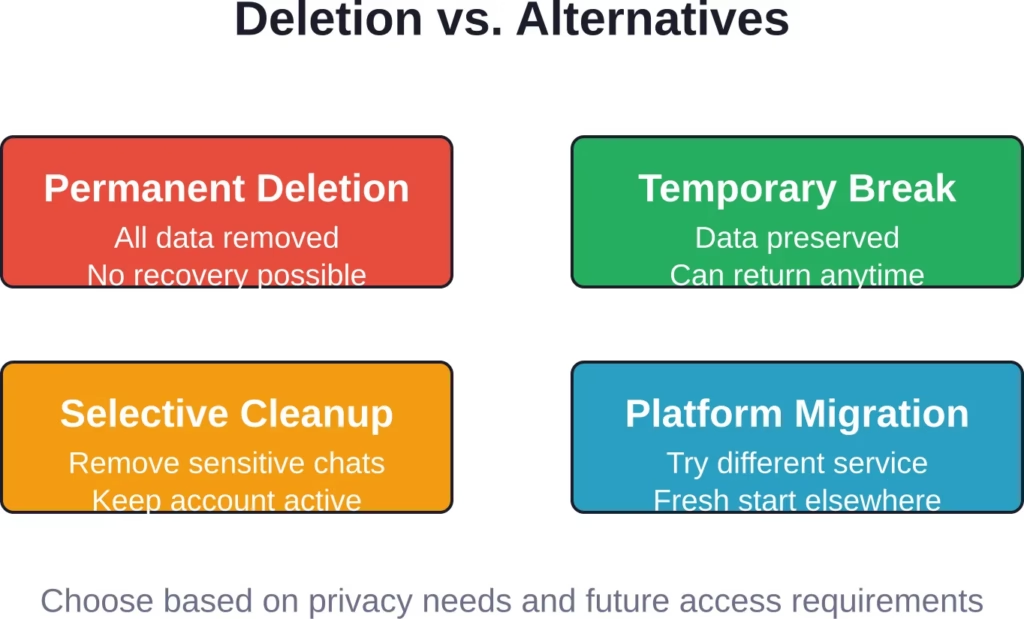
Deletion represents the nuclear option. Sometimes a less extreme approach solves the underlying concern.
Taking a Break Without Deleting
Simply logging out and uninstalling the app creates distance without permanent account removal. This preserves created characters and conversation histories for potential future access.
Change the account password to something random and don’t save it. This creates a soft lock—the account exists but becomes inaccessible without password recovery.
Privacy-Focused Account Maintenance
Delete specific conversations rather than the entire account. While manual and time-consuming, this approach removes sensitive content while maintaining account access.
Review privacy settings to minimize data collection. Character AI’s settings include options to limit certain tracking behaviors, though specifics depend on current platform features.
Exploring Alternative AI Chat Platforms
Dissatisfaction with Character AI doesn’t mean abandoning AI chat entirely. Several platforms offer different approaches to AI interaction.
Alternative platforms vary in content policies, privacy practices, and feature sets. Research options thoroughly before migrating to ensure the new platform better aligns with specific needs.
Explore Character-Based Content Outside Chat Platforms

Some users leave Character AI because they want something simpler than managing chats, accounts, and saved characters. R34.app uses a tag-based system instead of conversation-based interaction, so browsing works differently from typical AI chat platforms.
Browse Content in a Simpler Way
With R34.app, you can:
- Move through content without managing chats
- Search by tags instead of character setups
- Open results faster without extra menus
- Browse in one continuous flow
Go to R34.app and browse without dealing with account-based systems.
Common Issues and Troubleshooting
Deletion processes sometimes hit snags. Here are solutions to frequent obstacles.
Support Not Responding
If you experience delays or issues after using the built-in deletion feature, you can reach out to support. Send a follow-up email to [email protected] referencing your username and the deletion attempt.
Community discussions suggest persistence yields results. Polite, clear communication typically receives attention even when initial responses lag.
Unable to Verify Account Ownership
Lost access to the email address associated with an account complicates deletion. Support requires verification to prevent malicious deletion requests.
Prepare alternative verification information—account creation date, payment history, character names created, or other details demonstrating legitimate ownership.
Subscription Charges Continue After Deletion
Deletion requests don’t automatically cancel active subscriptions on all platforms. Check payment method records and subscription management in app store settings.
For iOS subscriptions, open Settings > [Your Name] > Subscriptions and manually cancel Character AI. Android users should navigate to Google Play Store > Profile > Payments & Subscriptions > Subscriptions.
Characters Still Visible After Deletion
As mentioned earlier, caching delays removal across all systems. If characters remain publicly accessible beyond 48 hours post-confirmation, contact support again with specific URLs of lingering content.
Legal Rights and Data Privacy Regulations
Jurisdiction matters significantly for data deletion rights.
Character Technologies, Inc. acknowledges regional privacy regulations in their privacy policy. Users in the European Economic Area, United Kingdom, and certain U.S. states enjoy enhanced data privacy rights under GDPR, UK GDPR, and state-level privacy laws.
These regulations grant rights including:
- Right to access personal data held by the company
- Right to request data deletion (“right to be forgotten”)
- Right to data portability
- Right to restrict processing
According to the official website, users can exercise these rights by contacting Character AI through their support portal or emailing [email protected] directly.
California residents specifically benefit from CCPA/CPRA protections. The platform’s Terms of Service specify that disputes are governed by California law and jurisdiction lies with courts in Santa Clara County, California.
When submitting deletion or data requests under privacy regulations, explicitly reference the applicable law. For example: “Under GDPR Article 17, I request deletion of all personal data associated with my account.” This invokes legal obligations that may receive prioritized handling.
Frequently Asked Questions
Can I recover a deleted Character AI account?
Generally speaking, account deletion is permanent and recovery isn’t supported. Once Character AI processes a deletion and sends confirmation, the account cannot be restored. This policy prevents security risks and ensures deletion requests are honored definitively. Users considering deletion should carefully weigh whether temporary alternatives better suit their needs.
How long does Character AI take to delete an account?
Processing times vary, with account removal typically completed shortly after confirmation through the in-app or website deletion feature. If you use the built-in option, deletion is usually processed within a few business days. Community reports show variation based on current system load.
Will my created characters be deleted too?
Created characters are typically removed as part of account deletion, though temporary visibility may persist due to caching. Character profiles usually disappear from public searches within 24-48 hours of account deletion confirmation. However, Character AI may retain character data internally for operational purposes as outlined in their privacy policy. Other users who interacted with the deleted characters won’t retain access to the original character profiles.
Can I delete my account from the mobile app directly?
Yes, the Character AI mobile app includes a built-in account deletion feature. Open your Profile, tap the settings icon (gear), and select Remove Account. Then enter your username to confirm. The process is available on both iOS and Android.
What happens to my subscription if I delete my account?
Active subscriptions should stop billing once account deletion processes, but manual cancellation through app store subscription management is recommended as a precaution. Character AI doesn’t automatically refund unused subscription time when accounts are deleted. Users seeking partial refunds should contact billing support separately before initiating account deletion to discuss options.
Does Character AI delete all my data immediately?
Not all data is deleted immediately or completely. According to the official privacy policy, Character AI may retain certain information even after account deletion for legal compliance, dispute resolution, and operational purposes. Specific retention periods aren’t publicly documented. Users can request information about data retention policies through [email protected] or exercise data access rights under applicable privacy regulations.
Can I just change my email and create a new account instead?
Technically possible, but this approach doesn’t address privacy concerns about existing data. Changing account email and abandoning the old account leaves all previous conversation logs, characters, and personal data intact on Character AI’s servers. True privacy protection requires formal deletion of the old account. If the goal is starting fresh rather than data privacy, creating a new account after proper deletion of the old one provides a cleaner slate.
Final Thoughts
Deleting a Character AI account is now much more straightforward thanks to the built-in deletion options in both the website and mobile app.
The process mainly involves going to your profile settings and confirming deletion with your username. In most cases, you no longer need to contact support unless you encounter issues or want to exercise additional data rights. Desktop and mobile users follow very similar paths, with only minor interface differences.
Data retention continues beyond account deletion for certain information types, and timelines can vary. Users with specific privacy concerns should reference applicable regulations like GDPR or CCPA when submitting additional requests.
Before committing to deletion, consider alternatives. Taking a break, selective content removal, or migrating to different platforms may address underlying concerns without losing created characters and conversation histories permanently.
Ready to make the move? Start by going to your profile settings on the website or in the app. Gather your username, and use the built-in Delete Account / Remove Account option. Expect processing within a few business days. The platform has made the process more user-friendly, giving you better control over your digital presence and personal data.