
Quick Summary: Character AI may stop working due to server outages, internet connectivity issues, browser cache problems, or app glitches. Most issues can be resolved by checking the official status page, clearing cache and cookies, updating the app, or switching browsers. If login fails, verify your credentials and check for service-wide outages on platforms like Downdetector.
Character AI suddenly refusing to load? Messages stuck in limbo? Login screen greeting users with cryptic errors?
These frustrations hit thousands of users daily. But here’s the thing—most Character AI problems stem from a handful of predictable causes, and the fixes are surprisingly straightforward.
This guide breaks down exactly why Character AI stops working and how to restore it fast. No fluff, no guesswork.
Check the Official Character AI Status First
Before diving into device troubleshooting, confirm whether the problem sits on Character AI’s end or locally.
The official Character AI status page at status.character.ai tracks real-time system performance. According to the official website, the platform monitors uptime for Search, Chats, Voices, and Characters separately—with historical uptime showing 99.71% and 99.89% over 90-day periods.
When major outages occur, the status page posts incident reports. As of May 19, 2026, the page shows “All Systems Operational,” but checking this resource takes thirty seconds and eliminates uncertainty.
Real talk: if the status page confirms “Major Outage” or “Degraded Performance,” no amount of cache-clearing or app reinstalling will help. Wait for Character AI’s team to resolve the backend issue.
Alternative Status Checkers
Downdetector provides crowdsourced outage reports. When Character AI experiences widespread problems, user reports spike on this platform within minutes.
The service shows a map of concentrated problem areas and tracks whether issues relate to login, server connection, or game launch. If hundreds of reports flood in simultaneously, the platform is likely experiencing service-wide disruption.
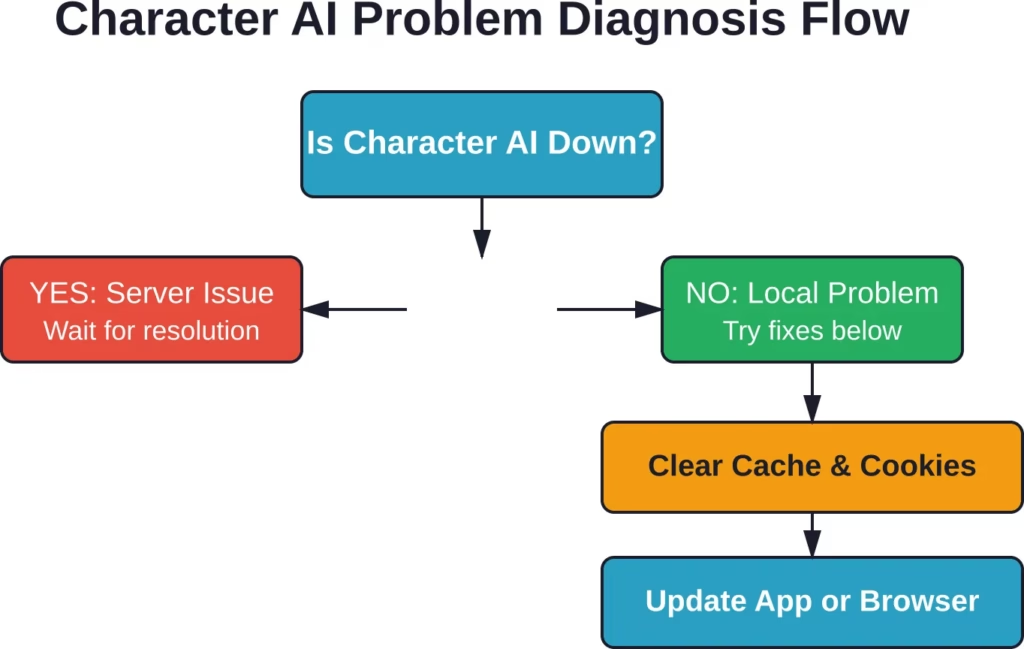
Common Causes of Character AI Failures
Character AI issues generally fall into five buckets. Understanding which category applies narrows down the solution fast.
1. Server-Side Outages and Maintenance
Character AI runs on cloud infrastructure that occasionally experiences hiccups. Major outages typically affect all users simultaneously.
The platform’s incident history page documents past disruptions. When servers go down, Character AI investigators post updates acknowledging the issue and tracking resolution progress.
Nothing can be done during these periods except wait. The good news? Based on available data, Character AI maintains uptime above 99.6%, meaning true outages remain relatively rare.
2. Internet Connectivity Problems
Spotty Wi-Fi or mobile data causes Character AI to freeze mid-conversation or fail to load entirely.
Test connectivity by opening other websites or streaming services. If those also stutter, the problem lives with the internet connection, not Character AI.
Simple resets—restarting the router, toggling airplane mode on mobile devices, or switching from Wi-Fi to cellular data—often resolve transient connectivity glitches.
3. Browser Cache and Cookie Corruption
Browsers store temporary data to speed up website loading. But when this cached data becomes corrupted or outdated, Character AI may display blank pages, throw login errors, or freeze during message exchanges.
Clearing cache and cookies forces the browser to fetch fresh data from Character AI’s servers. This single step resolves a surprising percentage of “not working” complaints across community discussions.
4. Outdated App or Browser Versions
Character AI updates its web application and mobile apps regularly. Running outdated software creates compatibility mismatches that manifest as crashes, login failures, or missing features.
Browser versions matter too. Ancient Chrome, Firefox, or Safari releases may lack support for modern web technologies Character AI relies on.
Keeping software current prevents these issues before they start.
5. Account-Specific Login Issues
Sometimes the platform works fine—except for one specific account. Forgotten passwords, typos in email addresses, or pending verification emails cause login screens to reject credentials.
Character AI’s support documentation addresses troubleshooting steps for users not receiving login or verification emails, a common pain point during account creation or password resets.
| Problem Type | Typical Symptoms | Quick Test |
|---|---|---|
| Server Outage | All devices fail, error messages mention servers | Check status.character.ai |
| Internet Issues | Other sites also slow/broken | Test YouTube or Google |
| Cache Corruption | Blank pages, old content, login loops | Open incognito/private mode |
| Outdated Software | Crashes, missing features, visual glitches | Check app store for updates |
| Account Problems | Only affects one login, works on other accounts | Try password reset |
Step-by-Step Fixes for Character AI Issues
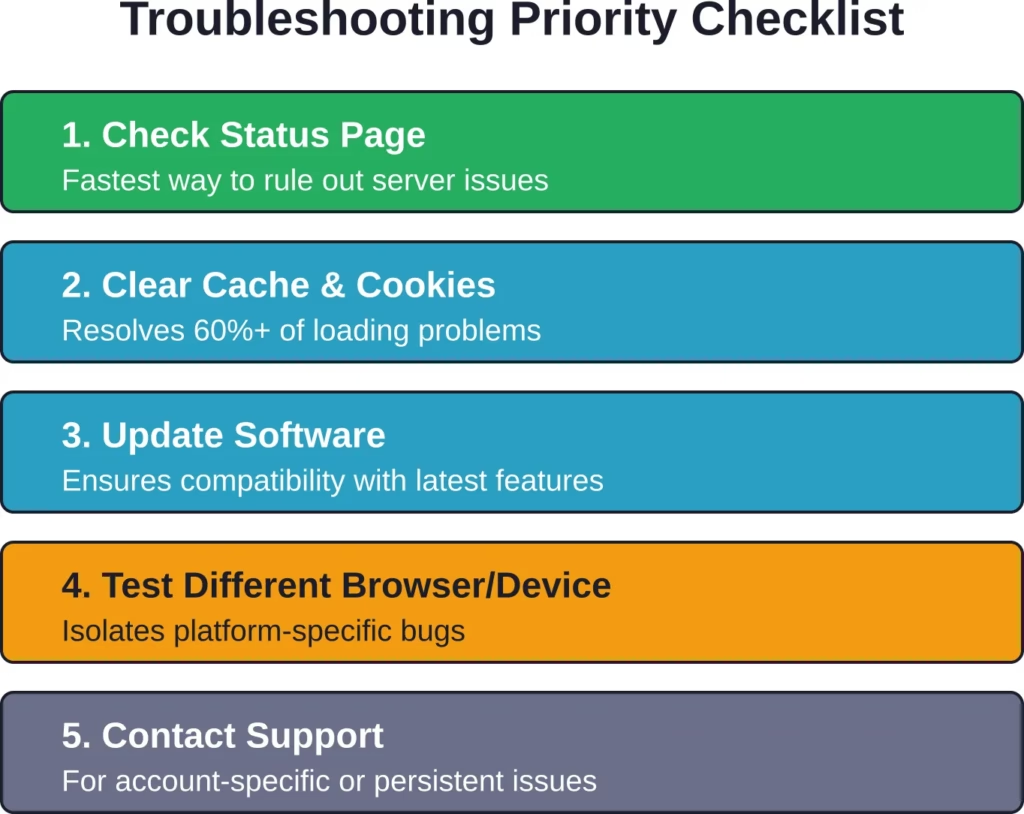
Now for the practical troubleshooting. Work through these solutions in order—most users find relief within the first three steps.
Fix 1: Verify Character AI Server Status
Start here. Visit status.character.ai and check the operational status of all components.
If any service shows “Major Outage” or “Partial Outage,” the problem sits outside individual control. The official Discord server (linked from the status page) often provides real-time updates during incidents.
Downdetector offers a secondary confirmation. A sudden spike in user reports indicates widespread disruption rather than isolated technical problems.
Fix 2: Clear Browser Cache and Cookies
For desktop browsers:
- Chrome: Settings → Privacy and security → Clear browsing data → Select “Cookies” and “Cached images” → Choose “All time” → Clear data
- Firefox: Settings → Privacy & Security → Cookies and Site Data → Clear Data
- Safari: Preferences → Privacy → Manage Website Data → Remove All
After clearing, close the browser completely and reopen it. Navigate to Character AI and attempt to log in.
For mobile apps, head to device settings, find Character AI under Apps or Storage, and select “Clear Cache” (not “Clear Data,” which deletes login info).
Fix 3: Update the Character AI App or Browser
Mobile users should check their app store (iOS App Store or Google Play) for pending Character AI updates. Install any available versions.
Browser users should update to the latest release. In Chrome, type chrome://settings/help in the address bar. Firefox and Safari have similar update checks in their settings menus.
Restart the browser or device after updating to ensure changes take effect.
Fix 4: Try a Different Browser or Device
Browser-specific bugs occasionally interfere with Character AI. If Chrome fails, test Firefox or Safari.
Similarly, if the mobile app acts up, try accessing Character AI through a mobile browser instead. This isolates whether the issue stems from the app itself or the underlying service.
Some users report better stability with certain browsers. Community discussions suggest Chrome and Firefox generally offer the smoothest experience, though results vary.
Fix 5: Check Internet Connection Stability
Run a speed test at fast.com or speedtest.net. Character AI requires stable bandwidth for real-time messaging—if speeds dip below 1 Mbps or latency spikes above 200ms, conversations may lag or disconnect.
Restart the router by unplugging it for 30 seconds. Switch from Wi-Fi to wired Ethernet if possible, or from Wi-Fi to cellular data on mobile devices.
Public Wi-Fi networks with restrictive firewalls sometimes block websockets, which Character AI uses for live chat. Switching to a personal hotspot can reveal whether network restrictions cause the failure.
Fix 6: Disable Browser Extensions
Ad blockers, privacy extensions, and VPNs occasionally interfere with Character AI’s functionality. Some extensions block tracking scripts that the platform requires for session management.
Test by opening an incognito or private browsing window (which disables most extensions by default). If Character AI works there, disable extensions one by one to identify the culprit.
VPN users should try disconnecting temporarily. Certain VPN servers or protocols trigger security filters on Character AI’s backend.
Fix 7: Reset Password and Verify Account Status
If login repeatedly fails despite correct credentials, initiate a password reset. Character AI sends a verification email with reset instructions.
Not receiving the email? Check spam folders and ensure the email address matches the one used during registration. According to Character AI’s troubleshooting documentation, email delivery issues occasionally occur—waiting 10-15 minutes and checking again often resolves this.
For persistent problems, contacting Character AI support through their official support site (linked from status.character.ai) provides account-specific assistance.
Try a Different Way to Browse Content You Want

Character AI issues often come from server load, moderation systems, or chat limitations. R34.app works differently by focusing on direct tag-based browsing instead of live chatbot interaction, which creates a different kind of experience.
Explore Content Without Delays
With R34.app, you can:
- Open results without waiting on responses
- Browse through connected tags quickly
- Move between themes without restarting
- Use a simpler search-based structure
Go to R34.app and explore content without waiting on chat systems.
Platform-Specific Troubleshooting
Character AI runs across multiple platforms, each with unique quirks. Targeted fixes based on device type accelerate resolution.
Mobile App Issues (iOS and Android)
Mobile apps introduce variables like background app refresh limits, storage constraints, and OS-level permissions.
For app crashes or freezes:
- Force quit the app (swipe up on iOS, use app switcher on Android) and reopen
- Restart the phone completely
- Check available storage—apps malfunction when devices run low on space
- Reinstall the Character AI app (uninstall first, then download fresh from app store)
Android users experiencing persistent crashes should check if battery optimization settings force-close Character AI in the background. Disabling optimization for Character AI in Settings → Battery → App Optimization can help.
iOS users with login problems should verify Face ID or Touch ID settings haven’t locked them out. Manually entering the password instead of relying on biometric auth sometimes bypasses glitches.
Desktop Browser Issues
Desktop browsers offer more troubleshooting options but also more complexity.
If Character AI won’t load at all, open browser developer tools (F12 or right-click → Inspect) and check the Console tab for error messages. Red text indicating “failed to fetch” or “network error” points to connectivity or firewall problems.
Errors mentioning “CORS” or “blocked by policy” suggest browser extensions or corporate network security interferes with requests.
For persistent desktop issues, create a fresh browser profile. In Chrome, go to Settings → Manage profiles → Add profile. Sign into Character AI from this clean profile—if it works, the old profile has corrupted settings or conflicting extensions.
Network and Firewall Considerations
Corporate networks, school Wi-Fi, and public hotspots often restrict access to AI chatbot platforms.
Symptoms include partial loading (the page appears but chats won’t send), immediate disconnects, or inability to reach character.ai entirely.
Testing from a mobile hotspot or home network determines whether network restrictions cause the blockage. If confirmed, contacting network administrators or using a VPN (if allowed by network policy) provides workarounds.
When to Contact Character AI Support
Most issues resolve through the steps above. But some situations require official intervention.
Reach out to Character AI support when:
- Account suspension or ban messages appear
- Payment or subscription issues arise
- Verification emails never arrive despite multiple attempts
- Specific characters refuse to load while others work fine
- Problems persist across all devices, browsers, and networks after trying every fix
The official support site, accessible from status.character.ai, hosts documentation and contact forms. Response times vary, but community discussions suggest support typically responds within 24-48 hours for account-specific issues.
Preventing Future Character AI Problems
Proactive maintenance reduces the likelihood of future disruptions.
Enable automatic updates for browsers and mobile apps. Most “not working” scenarios stem from running outdated software versions that introduce compatibility gaps.
Periodically clear browser cache and cookies—monthly clears prevent buildup that eventually causes slowdowns or errors.
Bookmark the official status page (status.character.ai) and Downdetector’s Character AI page. Checking these first saves time during outages.
For frequent users, consider using Character AI’s official Discord server for real-time status updates and community troubleshooting. Other users often share workarounds during service disruptions faster than official channels.
| Prevention Strategy | Frequency | Impact |
|---|---|---|
| Update browser/app | Automatic or weekly | High—prevents compatibility issues |
| Clear cache & cookies | Monthly | Medium—reduces corruption buildup |
| Check status page during issues | As needed | High—saves troubleshooting time |
| Monitor storage space | Weekly (mobile) | Medium—prevents app crashes |
| Test connection speed | When lagging | Medium—identifies network bottlenecks |
Understanding Character AI’s Infrastructure
Knowing how Character AI operates helps set realistic expectations and understand why certain problems occur.
Character AI runs as a neural language model chatbot service. Users create and interact with AI-powered conversational agents that generate human-like text responses for roleplay, storytelling, and contextual chat experiences.
This architecture requires constant server-side computation. Unlike static websites that simply deliver pre-built pages, Character AI processes every message through machine learning models hosted on remote servers.
That dependency introduces potential points of failure: server overload during peak usage, model updates that temporarily disrupt service, or network latency between users and data centers.
The platform reports uptime figures between 99.71% and 99.89% over 90-day periods.
Understanding this architecture clarifies why some fixes work. Clearing cache addresses client-side data corruption. Updating apps ensures compatibility with backend API changes. Checking server status acknowledges the service’s distributed nature.
Frequently Asked Questions
Why does Character AI say “Unable to load” or show a blank screen?
Blank screens or “unable to load” messages typically result from browser cache corruption or outdated app versions. Clear cache and cookies, then refresh the page. If using the mobile app, update to the latest version from the app store. Testing in a private/incognito browser window helps determine if extensions or cached data cause the blockage.
How do I know if Character AI is down for everyone or just me?
Check the official status page at status.character.ai for confirmed outages. Alternatively, visit Downdetector and search for Character AI—a spike in user reports indicates widespread problems. If both show green/operational status but issues persist, the problem likely stems from local connectivity, browser settings, or account-specific factors.
What should I do if Character AI won’t accept my login credentials?
First, double-check the email address and password for typos. If login still fails, initiate a password reset through the login page. Character AI sends verification emails within a few minutes—check spam folders if nothing arrives. For persistent problems, Character AI’s troubleshooting documentation addresses common verification email issues and account recovery steps.
Why do my Character AI messages stop sending mid-conversation?
Mid-conversation failures usually point to internet connectivity drops or server-side rate limiting. Test connection stability by opening other websites. If those work fine, Character AI’s servers may be experiencing degraded performance—check the status page. Refreshing the page or restarting the app often resumes the conversation without data loss.
Can browser extensions cause Character AI to malfunction?
Yes. Ad blockers, privacy extensions, and VPNs sometimes interfere with Character AI’s websocket connections or tracking scripts needed for session management. Test by disabling extensions one by one or using an incognito window (which disables most extensions by default). If Character AI works in incognito mode, an extension is the likely culprit.
Does Character AI work on all browsers?
Character AI officially supports modern versions of Chrome, Firefox, Safari, and Edge. Older browser versions may lack support for web technologies the platform relies on. For best results, update to the latest browser release. Community discussions suggest Chrome and Firefox offer the most consistent performance, though Safari works well on macOS and iOS.
What do I do if none of the troubleshooting steps fix my issue?
After exhausting standard fixes—clearing cache, updating software, testing different devices and networks—contact Character AI support through the official support site linked from status.character.ai. Provide specific details: error messages, device type, browser version, and steps already attempted. Account-specific issues often require backend investigation by support staff.
Conclusion
Character AI disruptions frustrate users, but the underlying causes are usually straightforward and fixable.
Server outages require patience and monitoring the status page. Local issues—cache corruption, outdated software, connectivity glitches—respond quickly to systematic troubleshooting.
Work through the fixes in order: verify server status, clear cache, update software, test alternative browsers or devices. Most problems resolve within these first steps.
For persistent issues that survive all troubleshooting attempts, official support channels provide account-specific assistance.
Bookmark status.character.ai for instant outage checks during future problems. Enable automatic updates to prevent compatibility issues before they start. And remember—when Character AI stops working, the solution is almost always within reach.
Ready to get back to chatting? Start with the status page check and work down the list. Most users restore functionality within minutes.