
Quick Summary: Character AI users cannot delete characters they’ve created — the platform only allows hiding or archiving them to make them private or less visible. To manage unwanted characters, navigate to the character’s page, access settings, and select options to make the character private or remove it from public listings. For characters created by others, users can delete chat history but not the character itself.
Character AI has become one of the most popular AI chat platforms, with millions of user-created personalities. But here’s something that catches many users off-guard: you can’t actually delete characters you’ve created in the traditional sense.
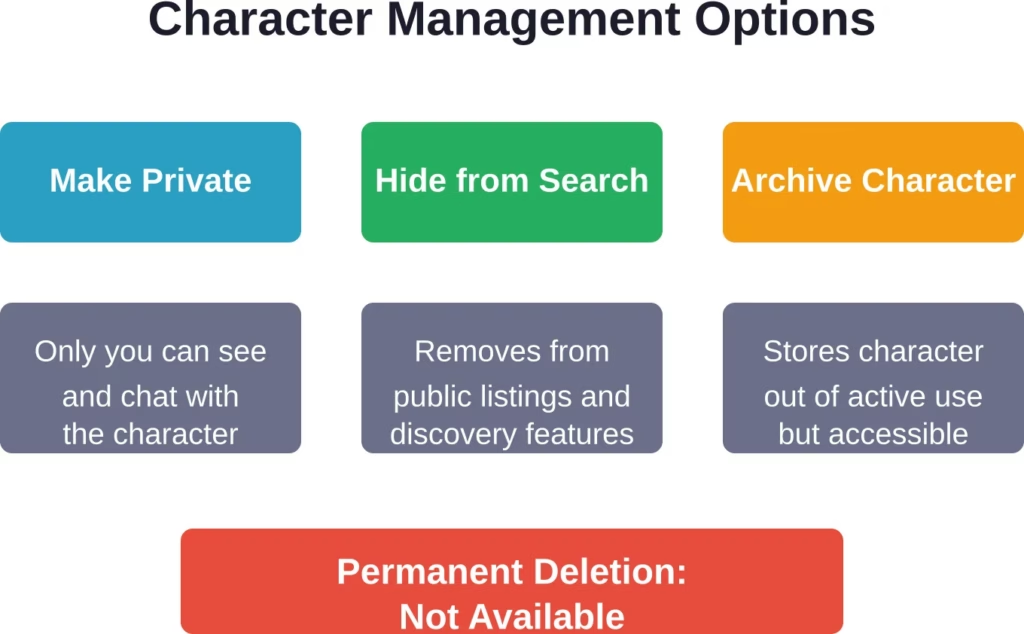
The platform doesn’t offer a permanent deletion button for characters. Instead, it provides options to hide, archive, or make characters private. This guide walks through exactly what you can do to manage unwanted characters.
Understanding Character AI’s Deletion Limitations
According to the official Character.AI support resources, the platform’s architecture doesn’t support full character deletion once a character is created. This design choice stems from data management and community interaction considerations.
So what are your actual options? You can make characters private, hide them from public view, or stop them from appearing in search results. For practical purposes, these actions achieve similar results to deletion — the character becomes invisible to others and won’t clutter your profile.
How to Hide Your Own Characters
For characters you’ve created, follow these steps to make them effectively invisible:
- Navigate to the character’s profile page by clicking on it from your character list: Look for the settings or edit icon, typically represented by three dots or a gear symbol in the top-right corner. From the dropdown menu, select the privacy or visibility options.
- Change the character’s status to “Private” or toggle off public visibility: This prevents others from discovering or interacting with the character. The character remains in your account but won’t appear in search results or public listings.
Some users report being able to archive characters, which moves them to a separate section. While this doesn’t delete them, it clears them from your active character roster.
Deleting Chat History with Characters
Here’s what you actually can delete: individual chat conversations. Whether the character is yours or created by someone else, you have full control over your chat history.
Open the conversation you want to remove. Tap or click the three-dot menu icon within the chat interface. Select “Delete Chat” or “Remove Conversation” from the options. This permanently removes the chat history from your account.
According to Character.AI’s privacy policy (last updated August 27, 2025), when users request data deletion, the platform removes personal information to the extent required by applicable privacy laws. However, this applies to user data and account information rather than character entities themselves.
Managing Third-Party Characters
Characters created by other users present a different situation. You can’t modify or remove them from the platform — only the original creator has management rights.
What you can do is delete your chat history with these characters and choose to stop interacting with them. The character will simply stop appearing in your recent chats once you’ve cleared the conversation history.
If a character violates platform guidelines, users can report it through the support system at support.character.ai. The Character.AI moderation team reviews reported characters and may take action if community standards are breached.
Account Deletion and Data Removal
For users who want to completely remove their presence from Character.AI, full account deletion is the most comprehensive option. This process removes your account, associated data, and chat history.
Account deletion is permanent and can’t be reversed. Before proceeding, consider whether simply making characters private or deleting individual chats might meet your needs without losing access to the platform entirely.
Move Beyond Character AI and Browse Content Hassle-Free

Some users want a simpler experience than managing saved chats, characters, and account settings. R34.app works through direct browsing and searchable tags instead of conversation-based interaction, making exploration feel more straightforward.
With R34.app, you can:
- Explore content without creating chat histories
- Search through tags instead of character menus
- Open results without extra setup
Go to R34.app and browse without dealing with chat management.
FAQ
Can I permanently delete a character I created on Character AI?
No, Character.AI doesn’t offer permanent character deletion. You can make characters private, hide them from search, or archive them, but complete removal isn’t supported by the platform’s current functionality.
What happens when I make a character private?
Making a character private restricts visibility to you only. Other users can’t discover, search for, or interact with the character. It remains in your account but becomes invisible to the broader community.
Can I delete characters created by other users?
No, you can only delete your chat history with characters created by others. The character itself remains on the platform, and only the original creator can modify its visibility or settings.
How do I delete my entire Character AI account?
You can delete your Character.AI account directly in the settings: on the website go to Profile Settings → Delete Account, or in the mobile app tap your Profile → settings icon → Remove Account, then enter your username to confirm. No support ticket is required in most cases.
Will my chat history be permanently deleted?
Yes, when you delete individual chats through the conversation menu, that chat history is permanently removed from your account. Account-wide data deletion follows the process outlined in Character.AI’s privacy policy.
Can I recover a character after hiding it?
Yes, characters that are made private or hidden can be restored to public visibility through the same settings menu. Unlike deletion, privacy changes are reversible.
How long does account deletion take?
Processing times vary, but Character.AI typically handles deletion requests within a reasonable timeframe as required by privacy regulations. Contact support for specific timing questions regarding your deletion request.