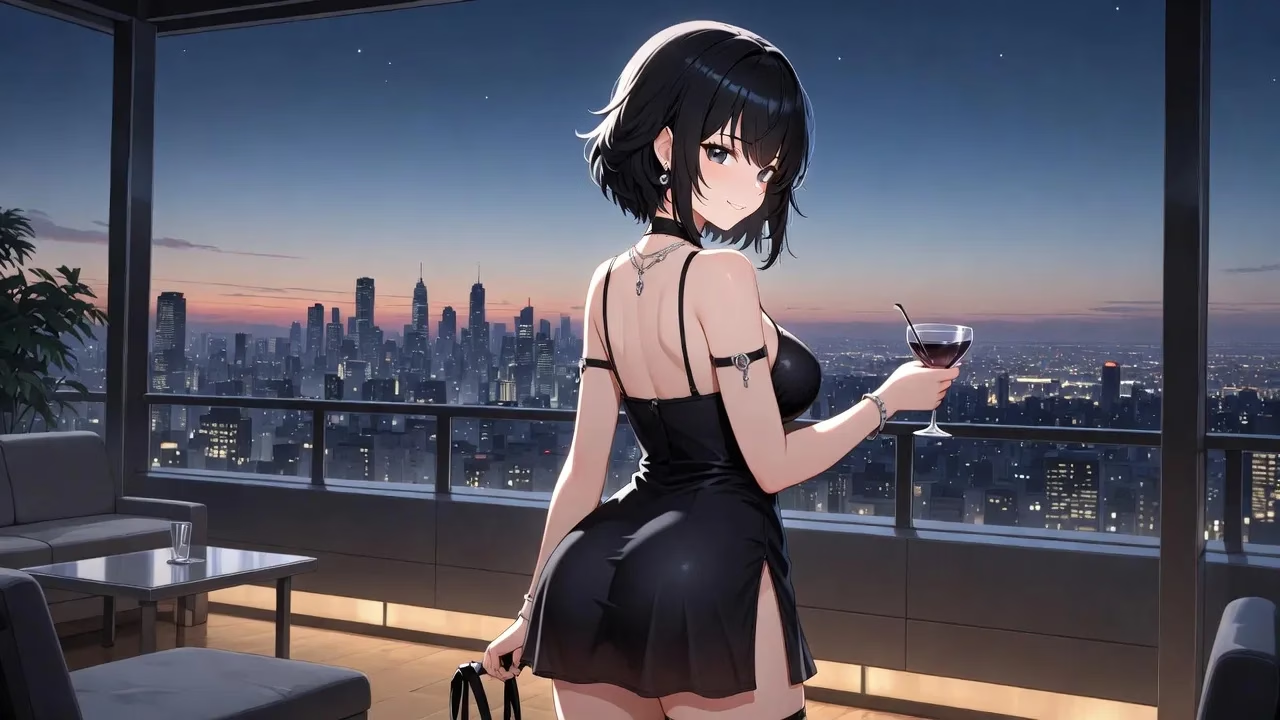
Quick Summary: AI-generated hentai is created using generative AI models like Stable Diffusion and ControlNet, trained on anime-style datasets. Users input text prompts describing characters and scenes, and the AI generates custom images. Popular platforms include specialized generators with anime modes, though ethical considerations around consent, copyright, and artist impact remain important concerns.
The intersection of artificial intelligence and adult anime art has created an entirely new creative space. What once required years of drawing skill can now be generated in seconds through carefully trained neural networks.
Generative Adversarial Networks (GANs) and diffusion models have transformed how adult anime content gets produced. According to research published on arXiv, GANs work by having two neural networks compete—one generates images while the other evaluates their authenticity. This adversarial process produces increasingly realistic outputs.
But here’s the thing—creating quality AI hentai isn’t just about typing random prompts into a generator. The technology has matured significantly, and understanding the underlying systems makes all the difference.
Understanding the Technology Behind AI Hentai Generation
At the core of most AI hentai generators sits a diffusion model, typically Stable Diffusion. This open-source text-to-image model was fine-tuned on massive datasets containing millions of anime-style images.
The process works through iterative refinement. The model starts with random noise and gradually sculpts it into a coherent image based on your text prompt. Each step removes a bit of the noise while adding details that match your description.
Stable Diffusion v1.5, as documented by Hugging Face, was finetuned for 595K steps on 512×512 pixel images from the LAION-Aesthetics V2 dataset. Later versions expanded resolution capabilities and improved detail rendering.
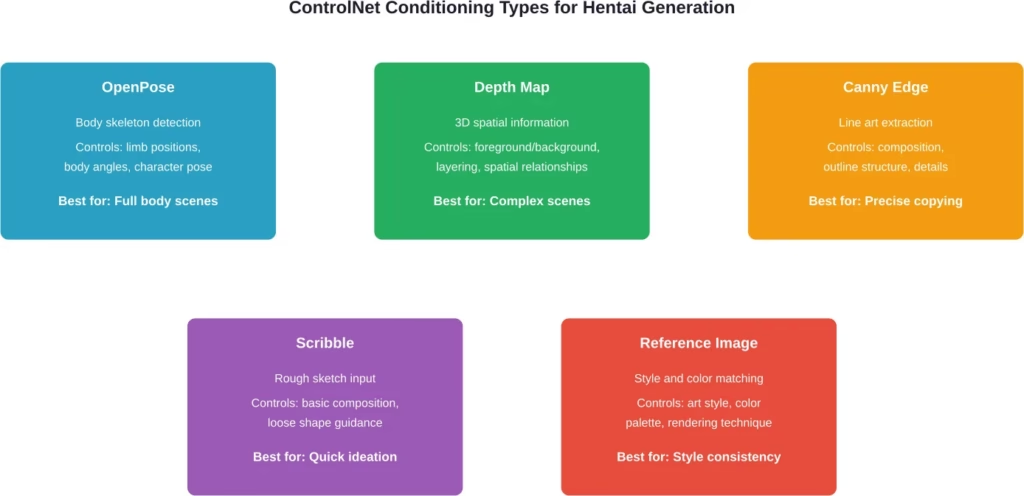
ControlNet adds another layer of precision. Research from GitHub shows this architecture lets users guide generation through additional inputs like edge maps, depth information, or pose skeletons. For hentai specifically, this means you can control character poses with far more accuracy than text prompts alone.
Key Components of the Generation Pipeline
Multi-conditional GANs, as described in arXiv paper 1805.01123, allow for multiple control vectors simultaneously. You’re not limited to just text—you can combine prompts with reference images, style specifications, and structural guides.
The mask embedding techniques documented in arXiv paper 1907.01710 enable targeted editing of specific image regions. Want to change hair color without regenerating the entire character? Mask embedding makes that possible.
Browse Visual Adult Posts by Tag

R34.app is built for browsing visual content through tags instead of long menus or categories. It collects images, GIFs, and videos from different imageboard-style sources, then lets people search by character, series, game, or keyword. That makes it easier to move straight to the type of content they want to view.
Looking for a Tag-Based Visual Content Browser?
R34.app can help with:
- searching by fandom, character, or keyword
- browsing image, GIF, and video posts
- unrestricted access to visual NSFW content
👉 Visit R34.app to explore its tag-based browsing system
Choosing Your Generation Method
There are two main approaches: specialized platforms or self-hosted solutions. Each has distinct advantages depending on technical skill and customization needs.
Specialized AI Hentai Platforms
Dedicated generators offer the lowest barrier to entry. These platforms run pre-configured models optimized specifically for anime and adult content.
Most platforms feature an “anime girlfriend mode” or similar NSFW-specific settings. Users typically create an account, select character attributes through dropdown menus, and generate images with a single click.
The advantage? Zero technical setup. The limitation? Less control over fine details compared to running models locally.
Community discussions indicate that platforms handling adult anime content typically implement several specialized models. Some focus on specific art styles—like the softer aesthetics common in certain hentai subgenres—while others prioritize anatomical accuracy or fantasy elements.
Self-Hosted Solutions with Stable Diffusion
Running Stable Diffusion locally provides maximum flexibility. According to community documentation, the RTX 3060 with 12GB VRAM is generally recommended for smooth generation at 512×512 resolution.
Higher-end GPUs enable larger resolutions and faster iteration. The RTX 4090 can generate 1024×1024 images in roughly the same time a 3060 produces 512×512 outputs.
Setting up a local installation involves downloading model checkpoints, installing the WebUI interface, and configuring extensions like ControlNet. The initial setup takes 2-4 hours for someone familiar with basic command-line operations.
| Approach | Setup Time | Cost | Customization | Best For |
|---|---|---|---|---|
| Online Platforms | 5 minutes | $15-30/month | Low | Beginners, quick generation |
| Local Stable Diffusion | 2-4 hours | $400+ GPU | Very High | Advanced users, full control |
| Cloud GPU Services | 30 minutes | $0.50-2.00/hour | High | Occasional users, no hardware |
Step-by-Step: Creating AI Hentai with Stable Diffusion
This section covers the self-hosted approach, which offers the most control and learning value. The process assumes a functioning Stable Diffusion installation with the Automatic1111 WebUI.
Step 1: Select and Load an Anime-Trained Model
The base Stable Diffusion model produces realistic photos. For anime aesthetics, specialized checkpoints trained on anime datasets are essential.
Download an anime-focused checkpoint file and place it in the models/Stable-diffusion folder. Common options include models specifically trained on anime imagery. These files typically range from 2GB to 7GB.
Restart the WebUI and select your anime model from the checkpoint dropdown at the top of the interface.
Step 2: Craft Effective Text Prompts
Prompt engineering makes or breaks generation quality. The model interprets your text literally, so precision matters.
Start with the subject: “1girl” or “2girls” tells the model how many characters to include. Follow with physical attributes: “long blue hair, red eyes, pale skin.”
Add composition details: “upper body, from side, looking at viewer.” These phrases control framing and perspective.
Include quality tags: “masterpiece, best quality, highly detailed.” Models trained on tagged datasets respond to these markers by allocating more attention to detail.
For NSFW content, explicit anatomical terms work better than euphemisms. The model has no concept of taboo—it simply matches patterns from training data.
Step 3: Configure Generation Parameters
Sampling steps control iteration count. Between 20-30 steps typically suffices for clean images. Higher values add minimal improvement while increasing generation time.
CFG Scale determines prompt adherence. Values of 7-11 work well for most anime generation. Lower values give the model more creative freedom; higher values force stricter prompt following.
Resolution should match your GPU capabilities. Start with 512×512. Cards with 12GB+ VRAM can handle 768×768 or higher.
Step 4: Integrate ControlNet for Pose Control
According to the official ControlNet repository on GitHub, this extension enables conditioning on structural inputs like pose skeletons or edge maps.
Install the ControlNet extension through the WebUI’s Extensions tab. Download the appropriate model files—for pose control, use the OpenPose preprocessor model.
In the ControlNet panel, upload a reference image or use the OpenPose editor to create a skeleton manually. The generator then follows this pose structure while applying your text prompt’s other attributes.
This technique proves especially valuable for complex multi-character scenes where pose relationships matter.
Step 5: Refine Through Iteration
First generations rarely hit the mark. Save promising outputs and use them as starting points for refinement.
The img2img tab allows uploading a generated image and modifying it with adjusted prompts. Lower the denoising strength to 0.3-0.5 for subtle changes, or increase it to 0.7+ for more dramatic alterations.
Inpainting targets specific regions. Mask the area requiring changes, write a focused prompt for that region, and regenerate only the masked portion.
Advanced Techniques for Quality Improvement
Once basic generation works reliably, several advanced methods push quality higher.
Embeddings and Textual Inversion
Textual inversion trains a custom token representing a specific concept not well-covered by the base model. Community members often train embeddings for particular character designs or art styles.
Download embedding files and place them in the embeddings folder. Reference them in prompts by their filename.
LoRA Models for Style Transfer
Low-Rank Adaptation (LoRA) models modify the base model’s behavior without replacing it entirely. These small files adjust specific aspects like art style or character features.
Install the LoRA extension, download desired LoRA files, and activate them through the WebUI. Multiple LoRAs can stack, though too many degrades coherence.
Upscaling for Higher Resolution
Generate at base resolution, then upscale. The ESRGAN models specifically trained on anime work better than generic upscalers.
Use the Extras tab in the WebUI. Upload your generated image, select an anime upscaler, and choose 2x or 4x scaling.
Ethical Considerations and Legal Boundaries
The technology enables creation of content that raises serious ethical questions. Understanding these concerns isn’t optional—it’s fundamental to responsible use.
Consent and Likeness Rights
According to the Take It Down Act signed in 2025, non-consensual intimate imagery including AI-generated deepfakes now carries federal penalties. Creating content resembling real individuals without consent violates this legislation.
Stick to entirely fictional characters with no resemblance to actual people. Even then, be aware that some jurisdictions regulate purely fictional content.
Copyright and Training Data
Models train on existing artwork, raising copyright concerns. Artists whose work appeared in training datasets didn’t necessarily consent to this use.
The legal landscape remains unsettled. Some jurisdictions consider AI outputs derivative works, while others classify them as transformative fair use.
Platform Policies
Most mainstream platforms prohibit AI-generated adult content. Terms of service violations can result in account termination or legal action.
Review platform guidelines before sharing generated content anywhere public.
Age Verification and Content Restrictions
The PROACTIV AI Data Act requires AI developers to identify and remove child sexual abuse material from training data. Generating content depicting minors, even fictional ones, violates federal law in most jurisdictions.
IEEE standards documents emphasize the importance of ethical AI development, including guidance on risk mitigation and transparency.
Common Issues and Troubleshooting
Certain problems appear frequently when generating anime content. Here’s how to solve them.
Anatomical Distortions
Hands, feet, and complex poses often generate incorrectly. ControlNet’s OpenPose significantly reduces these errors. Alternatively, generate the image with simplified poses, then use inpainting to fix problem areas.
Inconsistent Character Features
Generating multiple images of the same character while maintaining consistency requires additional tools. Character LoRAs trained on a specific design help, or use the same seed value with minor prompt variations.
Low Quality or Blurry Outputs
Increase sampling steps to 30-40. Verify you’re using an anime-specific model rather than the realistic base model. Add quality tags to your prompt.
VRAM Out of Memory Errors
Reduce resolution to 512×512 or lower. Enable the “–medvram” or “–lowvram” launch flags. Close other GPU-intensive applications.
Alternative Tools and Platforms
Beyond Stable Diffusion, several other tools serve the AI hentai generation space.
NovelAI
This subscription service uses proprietary anime models. The interface simplifies generation for users who want results without technical setup. Pricing varies—check their official site for current plans.
Waifu Diffusion
An open-source Stable Diffusion derivative fine-tuned specifically on anime imagery. Download and use like any other Stable Diffusion checkpoint.
Cloud-Based GPU Services
Services like Google Colab or RunPod allow running Stable Diffusion without local hardware. Hourly rates typically range from $0.50 to $2.00 depending on GPU tier.
| Platform | Type | Ease of Use | Customization | Hardware Required |
|---|---|---|---|---|
| Stable Diffusion WebUI | Self-hosted | Moderate | Excellent | Mid-range GPU |
| Specialized Generators | Web service | Very Easy | Limited | None |
| NovelAI | Subscription | Easy | Good | None |
| Google Colab | Cloud notebook | Moderate | Excellent | None |
Frequently Asked Questions
What GPU do I need to generate AI hentai locally?
According to documentation from the Stable Diffusion community on GitHub, an RTX 3060 with 12GB VRAM is generally recommended for comfortable generation at 512×512 resolution. Higher resolutions require more VRAM. Cards from the RTX 30 series or newer support the half-precision operations necessary for efficient generation.
Can I generate hentai for free?
Yes, through several methods. Run Stable Diffusion locally if you own compatible hardware. Use Google Colab’s free tier, though sessions have time limits and lower-priority GPU access. Some web platforms offer limited free generations daily. However, sustained high-volume generation requires either hardware investment or paid subscriptions.
Is it legal to create AI-generated hentai?
Legal status varies by jurisdiction and content type. Purely fictional adult anime content is legal in most regions. However, content depicting minors—even fictional ones—violates federal law in many countries. The Take It Down Act signed in 2025 prohibits non-consensual deepfakes resembling real people. Copyright questions around training data remain legally unsettled. Always research local laws before creating or distributing adult AI content.
How do I make characters look consistent across multiple images?
Several techniques help maintain consistency. Use the same seed value across generations, modifying only minor prompt elements. Train a character-specific LoRA on multiple images of your desired design. Use ControlNet’s reference image mode to condition new generations on previous outputs. Character embeddings trained through textual inversion also preserve specific features across generations.
What’s the difference between GAN and diffusion models?
As documented in arXiv research papers, GANs use two competing networks—a generator creates images while a discriminator evaluates authenticity. This adversarial training produces outputs. Diffusion models work differently: they learn to reverse a gradual noising process, starting with random noise and iteratively refining it into a coherent image. Diffusion models generally produce more stable, higher-quality results for complex images, which is why Stable Diffusion dominates current AI art generation.
Can I sell AI-generated hentai?
Copyright and licensing issues complicate commercial use. Model licenses vary—some prohibit commercial use, others allow it. Training data copyright questions remain unresolved in courts. Payment processors often reject adult content businesses. Platforms that permit adult content may prohibit AI-generated material specifically. If considering commercial distribution, consult an attorney familiar with both AI and adult content law in your jurisdiction.
How long does generation take?
Generation time varies significantly based on specific hardware configuration and settings. Higher-end GPUs generate significantly faster. Higher resolutions scale proportionally—a 1024×1024 image takes roughly four times longer than 512×512. Cloud services match these speeds based on the GPU tier selected.
Conclusion
Creating AI-generated hentai has evolved from experimental technology into an accessible creative tool. Whether using simplified web platforms or sophisticated self-hosted installations, the barrier to entry continues dropping.
The technical foundation—GANs, diffusion models, and ControlNet conditioning—enables unprecedented control over generated content. What once required professional illustration skills now emerges from carefully crafted text prompts.
But with this power comes responsibility. Legal frameworks are rapidly developing to address consent, copyright, and exploitation concerns. The Take It Down Act and PROACTIV AI Data Act represent early legislative responses to AI-generated intimate content.
Stay informed about both technical capabilities and ethical boundaries. The technology will continue advancing—how we choose to use it matters far more than what it can technically accomplish.
Ready to start generating? Begin with a specialized platform to learn prompt engineering basics, then migrate to self-hosted Stable Diffusion when you need more control. The tools are available; the rest is experimentation and practice.