
Quick Summary: Character AI responds based on the prompts, character definitions, and conversational context you provide. To make it say what you want, craft detailed prompts, create well-defined character descriptions with personality traits and speaking styles, use role-play framing, and iterate your input. The AI follows patterns in your instructions—specificity, tone guidance, and contextual cues dramatically improve output accuracy.
Character AI has revolutionized how people interact with virtual personas, from historical figures to original creations. But getting the platform to generate exactly the responses you’re imagining? That’s where most users hit a wall.
The difference between generic, disappointing replies and perfectly tailored conversations comes down to understanding how the underlying language model interprets your instructions. Character.AI uses sophisticated language models that respond to patterns, context, and specific framing techniques.
Here’s the thing though—the AI doesn’t read your mind. It reads your words, your structure, and the conversational framework you establish. Master those elements, and you’ll control the narrative.
Understanding How Character AI Processes Your Input
Before diving into techniques, you need to grasp the mechanics. Character.AI processes three primary information sources when generating responses: the character definition (set during creation), the ongoing conversation history, and your immediate prompt.
The platform’s language model analyzes patterns in successful conversations. When you chat with a character, it references the personality description, speaking style, and example dialogues you’ve provided. Academic research on prompt engineering shows that LLMs respond significantly better to structured, detailed instructions than vague requests.
According to a 2023 study referenced in prompt engineering research, employees who leveraged prompting strategies in task automation experienced up to 30% faster turnaround times on writing and editing tasks. The same principles apply to Character AI conversations.
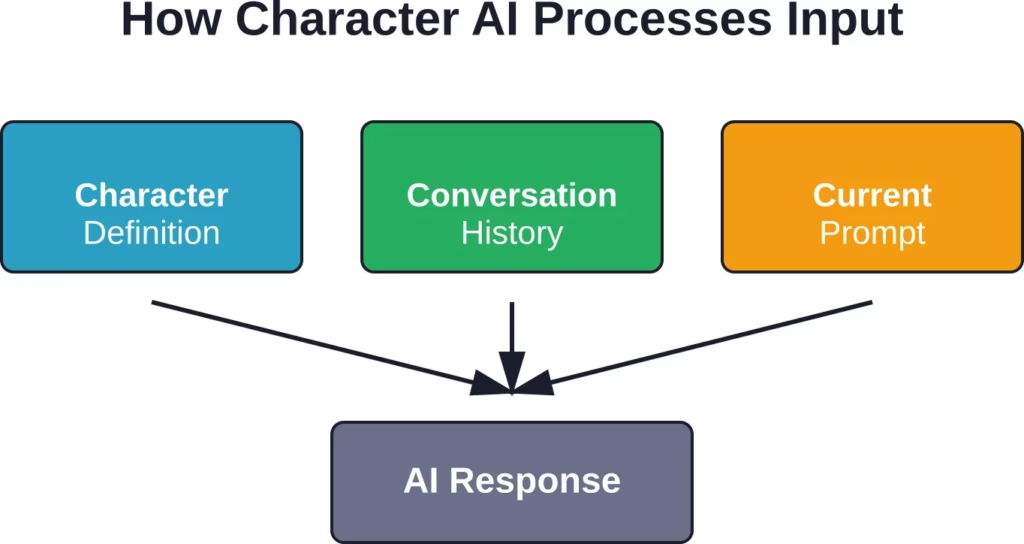
The model doesn’t “understand” intent the way humans do. It pattern-matches. Feed it clear patterns, and it mirrors them back with remarkable consistency.
Craft Detailed Character Definitions
The foundation of getting desired responses starts before the first message. When creating a character on Character.AI, the description field is your most powerful tool.
Generic descriptions like “a friendly person” produce generic responses. Instead, specify personality traits, communication styles, vocabulary preferences, and emotional tendencies. WikiHow’s guide on Character AI emphasizes that detailed character bots consistently outperform vague ones.
Include these elements in character definitions:
- Personality traits: List 4-6 specific characteristics (sarcastic, analytical, optimistic, formal)
- Speaking style: Describe sentence structure, vocabulary level, use of slang or technical terms
- Background details: Relevant history that informs responses
- Example dialogues: Show exactly how the character should respond to sample prompts
Real talk: the example dialogues matter more than most users realize. They train the model on your expectations. Write 3-5 short exchanges demonstrating the exact tone, length, and style you want.
Master Prompt Engineering Techniques
Now we get to the conversation itself. Prompt engineering—the art of structuring inputs for optimal AI outputs—transforms mediocre interactions into precisely controlled dialogues.
Research published on arXiv examining prompt engineering methods shows that specific techniques dramatically improve LLM performance across tasks. These same methods apply directly to Character AI.
Be Ridiculously Specific
Vague prompts get vague responses. Instead of “tell me about your day,” try “describe your morning commute in exactly three sentences, focusing on one unusual thing you noticed.”
The AI responds to structural cues. When you specify format, length, or focus, the model has clear parameters to follow.
Use Role-Play Framing
Character AI excels at role-play scenarios. Frame your prompts as scenes: “You’re sitting in a coffee shop when a stranger asks for directions. Respond with slight annoyance because you’re busy.”
This technique provides context, emotional state, and situation—three elements that guide response generation. Community discussions consistently report better results with scenario-based prompts.
Provide Tone and Style Guidance
The model can’t infer how you want something said unless you specify. Add descriptors: “Explain this concept using simple language, like you’re talking to a curious ten-year-old” or “Respond in formal Victorian English with elaborate metaphors.”
| Weak Prompt | Strong Prompt | Why It Works |
|---|---|---|
| Tell me a story | Tell me a 200-word mystery story about a missing heirloom, ending with an unexpected twist | Specifies genre, length, topic, and structure |
| What do you think? | Give me three reasons you disagree with this plan, each in one sentence, ordered from weakest to strongest | Defines quantity, format, and organization |
| Describe the room | Describe this library in exactly five sentences, using sensory details (sight, sound, smell) | Sets length limit and sensory focus |
Iterate and Refine
Don’t expect perfection on the first try. If the response misses the mark, immediately follow up with corrections: “That’s close, but make it more sarcastic” or “Rewrite that using technical jargon instead of simple terms.”
The conversation history becomes training data for subsequent responses. Each refinement teaches the model your preferences for that session.
Leverage Contextual Memory
Character AI maintains conversation history within a session. Use this to your advantage by building context gradually rather than front-loading every detail.
Start conversations by establishing key facts: “For this conversation, you’re a medieval blacksmith who’s suspicious of new technology.” The character will carry that context forward, influencing subsequent responses without needing reminders.
Context windows have limits. According to Character.AI’s official documentation, the platform processes information differently for teen versus adult accounts, with specific safety features that can affect response patterns. Very long conversations may lose early context, so reinforce critical details periodically.
Work Within Platform Limitations
Character.AI implements filters and safety features, particularly for teen accounts. The platform’s official blog post on teen safety outlines modifications to the language model and detection systems.
These filters exist for valid reasons—maintaining community standards across diverse users. Trying to bypass them violates Character.AI’s Terms of Service (last updated August 27, 2025) and risks account limitations.
Instead, work within the framework. If responses seem overly restricted, adjust your approach:
- Reframe mature themes as abstract discussions
- Use metaphorical language instead of explicit descriptions
- Focus on emotional nuance rather than graphic details
- Create adult characters on accounts that meet age requirements
Research from Anthropic on AI safety shows that alignment techniques and content filters continuously evolve. What triggers a filter today may change as models improve.
Advanced Techniques for Power Users
Chain Prompts for Complex Responses
Break complex requests into sequential prompts. Instead of asking for an entire story arc in one message, guide the AI through stages: “First, describe the setting in vivid detail.” Then: “Now introduce the main character with a focus on their internal conflict.” Finally: “Create a dialogue between this character and an antagonist.”
This technique produces more coherent, focused outputs than single massive prompts.
Use Negative Guidance
Tell the AI what to avoid: “Describe this battle scene without using clichés like ‘heat of battle’ or ‘clash of steel.’” Negative constraints often yield more creative results than positive instructions alone.
Establish Speech Patterns Early
In the first few exchanges, explicitly model the speech patterns you want: “Respond to everything with dry British humor and occasional Latin phrases.” Once established, the pattern tends to persist.
| Technique | Best For | Example Application |
|---|---|---|
| Specific formatting | Lists, structured responses | “Give me exactly five bullet points, each under 15 words” |
| Emotional framing | Dramatic scenes, character depth | “Respond with barely concealed rage, using short clipped sentences” |
| Comparative prompts | Style matching | “Write this explanation like Neil deGrasse Tyson would” |
| Constraint-based | Creative outputs | “Describe this without using the letter ‘e’” (experimental) |
Find Content You Need Without Prompt Tweaking

A lot of Character AI users spend time adjusting prompts and retrying responses to get the result they want. Browsing through R34.app feels more direct because content is organized through connected tags that are easier to move through naturally.
With R34.app, navigation feels simpler thanks to:
- Results that connect naturally through related tags
- Exploration that continues without restarting chats
- Content discovery focused on browsing instead of retries
- Easier movement between different themes and categories
👉Move to R34.app and explore content without adjusting prompts.
Common Mistakes That Ruin Responses
Even experienced users fall into traps that degrade output quality:
- Mistake one: Switching topics abruptly without transition. The AI interprets sudden changes as new contexts, potentially abandoning established patterns.
- Mistake two: Over-correcting mid-response. Let the AI finish before providing feedback. Interrupting with corrections creates conflicting instructions.
- Mistake three: Assuming the AI remembers everything. Refresh key details every 15-20 exchanges in long conversations.
- Mistake four: Using ambiguous pronouns. “Make him say it differently” leaves the model guessing. Specify: “Make the detective character rephrase that question more aggressively.”
Testing and Validation
Treat conversation design as an iterative process. Try variations of prompts to see what produces optimal results. Document what works for future reference.
Community discussions on platforms like Reddit reveal patterns: certain phrasings consistently outperform others. Users report that “show, don’t tell” instructions (using examples rather than descriptions) yield better results.
Prompt engineering research from arXiv emphasizes experimentation and systematic testing. Apply the same methodology to Character AI conversations—vary one element at a time, observe results, refine.
Frequently Asked Questions
Can you make Character AI say anything you want?
Not exactly. Character AI has built-in safety filters and content policies that prevent certain outputs, particularly harmful, illegal, or explicitly adult content. Within those boundaries, detailed prompts, well-crafted character definitions, and proper conversation techniques give substantial control over responses. The platform prioritizes safety while allowing creative freedom.
Why does Character AI give generic responses sometimes?
Generic responses typically result from vague prompts or underdeveloped character definitions. The AI relies on patterns in your input—when you provide minimal context or structure, it defaults to safe, generic outputs. Add specificity, contextual details, and formatting instructions to improve response quality immediately.
How long does Character AI remember conversation context?
Character AI maintains context throughout a conversation session, but very long chats may lose early details as the context window fills. The platform doesn’t publicly specify exact token limits, but users report context retention issues after extended exchanges. Reinforce critical information periodically in longer conversations.
Do character definitions really matter if you give good prompts?
Absolutely. Character definitions establish baseline behavior that influences every response. Even perfect prompts work within the character’s established personality framework. A character defined as “formal and academic” will struggle to produce casual slang-filled responses regardless of prompting. Invest time in detailed character creation for consistent, controlled outputs.
Why do some characters ignore instructions?
This usually happens when character definitions conflict with prompt instructions. If the character is defined as “cheerful and optimistic” but you prompt for “angry, bitter responses,” the model experiences competing instructions. Ensure prompts align with character definitions, or create characters specifically designed for the response style you want.
Is there a difference between public and private character performance?
Private characters allow complete control over definitions without community rating influences. Public characters may perform differently because other users’ conversations contribute to the model’s understanding of that character. For maximum control over responses, use private characters with detailed custom definitions.
Putting It All Together
Making Character AI say what you want isn’t about tricking the system or exploiting loopholes. It’s about understanding how language models process information and structuring your input accordingly.
Start with detailed character definitions that establish personality, speaking style, and behavioral patterns. Then craft specific, structured prompts that provide context, tone guidance, and clear formatting expectations. Use conversation history to build context gradually, and iterate on responses that don’t quite hit the mark.
The platform’s language model responds to patterns and specificity. Feed it vague inputs, get vague outputs. Provide detailed frameworks, and watch the responses align with your vision.
Research on prompt engineering consistently shows that structured approaches outperform casual interactions. The same principles apply to Character AI conversations.
Ready to transform your Character AI conversations? Start by revisiting your character definitions—add three specific personality traits and two example dialogues showing exactly how the character should respond. Then craft your next prompt with explicit formatting, tone, and content instructions. The difference will be immediate and dramatic.