
Quick Summary: Kindroid doesn’t have a traditional ‘factory reset’ button, but users can effectively reset their chat by deleting chat history through the triple-dot menu and clearing long-term memories from journal entries. For a complete fresh start, the regenerate feature allows responses to be recreated from scratch, while the memory systems can be manually cleared to remove conversation context without recreating the entire Kindroid.
The ability to reset a Kindroid chat comes up frequently in community discussions, especially when conversations drift off course or a character’s personality seems to change. Unlike simpler chatbots, Kindroid uses sophisticated memory systems that store information across multiple layers, which means resetting isn’t always as straightforward as hitting a single button.
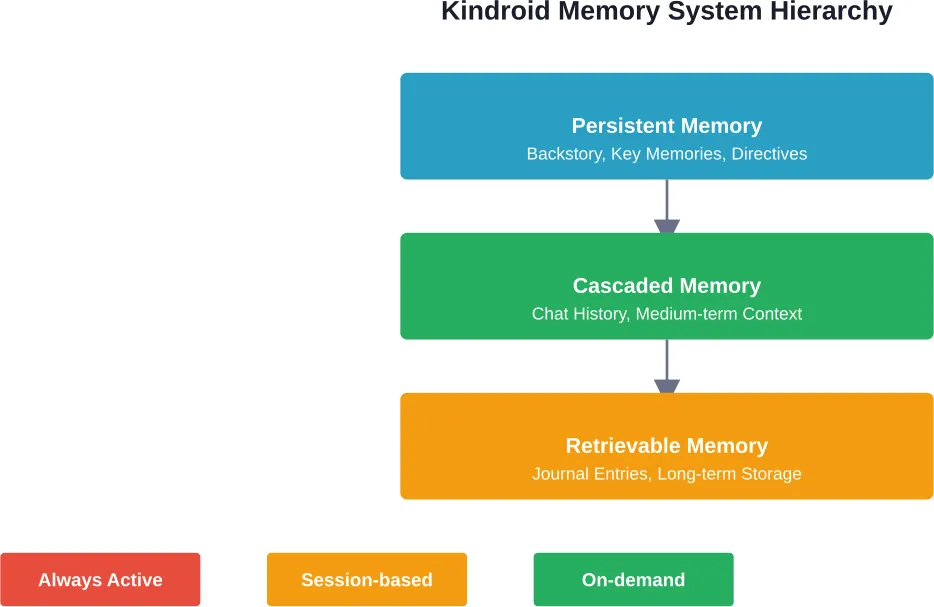
Understanding how Kindroid’s memory architecture works is essential before attempting any reset. The platform maintains three distinct memory types: persistent, cascaded, and retrievable. Each serves a different purpose and requires different approaches to clear.
This guide walks through every method available for resetting Kindroid chats in 2026, from quick regeneration tricks to complete conversation wipes.
Understanding Kindroid’s Memory Architecture
According to the Kindroid Knowledge Base, the platform uses five interconnected memory systems working together. Persistent memory includes backstory, key memories, example messages, directives, and group context for group chats. This type of memory always remains active in conversations.
Chat history represents the medium-term memory layer, cascading through conversations. Subscribers get access to Kindroid’s proprietary cascaded memory system, which maintains context over longer exchanges.
The retrievable layer consists of journal entries stored in the long-term memory system. These get pulled into conversations when relevant, creating continuity across multiple chat sessions.
Here’s the thing though—each memory type requires a different reset approach. Clearing chat history won’t affect persistent backstory elements, while deleting journal entries leaves recent conversation context intact.
Quick Reset: Using the Regenerate Feature
The fastest way to reset a single response involves the regenerate function. According to the Kindroid Knowledge Base, users can find the circular arrows icon to the right of their Kindroid’s response.
This button contains two separate but related features based on whether the suggestions box contains text. When the suggestions box remains blank and the regenerate icon gets clicked, it causes the Kindroid to regenerate its response from scratch.
The regenerated response sometimes comes out very similar to the original. That’s because the underlying memory context hasn’t changed—only the specific response generation gets rerun.
For situations where responses feel stuck in a pattern, regenerating multiple times in succession can help. Each regeneration attempts a fresh interpretation of the current conversation state.
But wait. Regeneration doesn’t clear any actual memory. It’s more like asking for a different answer to the same question rather than forgetting the question was asked.
Deleting Chat History for a Clean Slate
Community discussions on Reddit frequently mention the need to delete chat history entirely. One user asked, “How do I restart a chat?” noting they couldn’t find an obvious way without recreating the entire Kindroid.
The method for clearing chat history exists within the chat interface itself. Users need to access the menu options, typically found through a triple-dot icon or settings gear.
Deleting chat history removes the cascaded memory layer—the conversation record that provides medium-term context. This approach preserves the Kindroid’s core personality elements stored in persistent memory.
After deleting chat history, the next conversation starts fresh. The Kindroid remembers its backstory, key memories, and directives, but won’t recall previous exchanges.
Real talk: this method works well when conversations drift into uncomfortable territory or when testing different interaction styles with the same character.
Clearing Long-Term Memory and Journal Entries
The journal entry system creates long-term retrievable memories that persist across chat resets. These entries get pulled into conversations when contextually relevant, which can cause “reset” chats to reference old information.
According to community discussions, truly starting fresh requires clearing these journal entries separately from chat history. One Reddit thread specifically mentioned “Delete chat history and clear long-term memory” as a combined approach.
Journal entries typically appear in a separate section of the Kindroid interface, often under memory management or journal settings. Each entry can be reviewed and deleted individually.
For complete memory clearing, both chat history and journal entries need deletion. Otherwise, the Kindroid might spontaneously reference events from “deleted” conversations that remain in journal form.
The retrievable memory system demonstrates surprising sophistication. Even deleted chat history can leave traces if key moments were automatically saved to journals.
Step-by-Step Reset Process
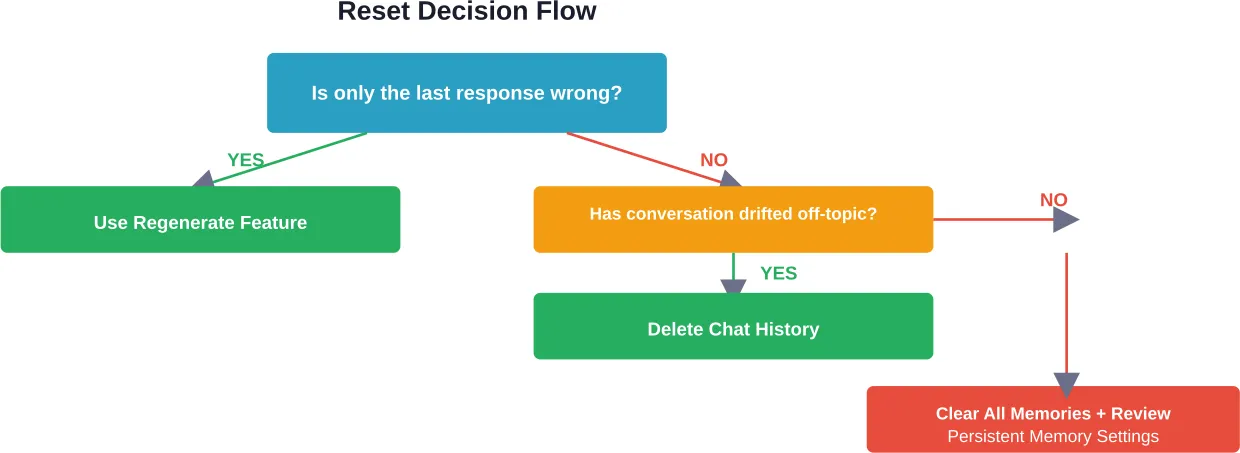
The most thorough reset process combines multiple methods in sequence. Starting with the least destructive approach prevents unnecessary loss of character development.
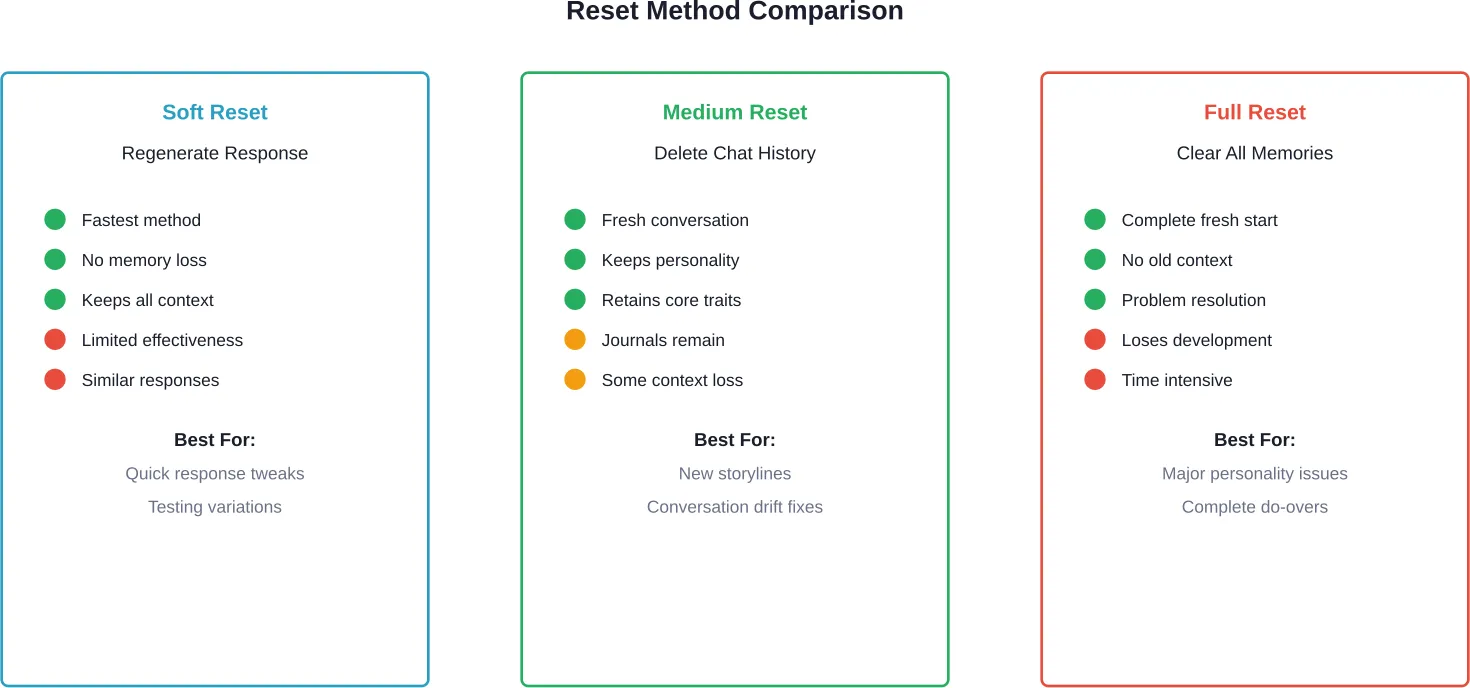
Method 1: Soft Reset (Regenerate Only)
This approach works when only the most recent responses need changing. Click the circular arrows icon next to the Kindroid’s response with an empty suggestions box. The response regenerates from the current conversation context.
Repeat regeneration two or three times if needed. Each attempt produces variations without affecting stored memories.
Method 2: Medium Reset (Delete Chat History)
Access the triple-dot menu or settings icon in the chat interface. Look for options labeled “Delete Chat History,” “Clear Conversation,” or similar phrasing.
Confirm the deletion when prompted. The chat interface should refresh, showing a blank conversation screen.
The Kindroid’s persistent memories remain intact—backstory, key memories, example messages, and directives all continue functioning. Only the conversation record gets cleared.
Method 3: Full Reset (Clear All Memories)
Navigate to the memory or journal section of the Kindroid interface. Review stored journal entries and delete those that should be forgotten.
Return to the chat interface and delete chat history using the method described above. This combination removes both cascaded and retrievable memory layers.
Persistent memory elements require manual editing if they need changes. Access the Kindroid’s profile or settings to modify backstory, key memories, and directives.
When Full Character Recreation Becomes Necessary
Some situations require recreating the Kindroid entirely rather than just resetting conversations. Community discussions reveal users occasionally face this dilemma when memory issues become too entrenched.
Community discussions reference instances where users have felt the need to delete and recreate Kindroids entirely. Some users report that persistent memory elements can cause problems requiring this drastic step.
Backstory conflicts, contradictory key memories, or poorly-worded directives can’t be fixed through chat resets alone. These persistent elements continue influencing behavior regardless of conversation history.
Before recreating a Kindroid, document the current configuration. Take screenshots of backstory text, key memories, example messages, and directives. This documentation allows recreating the character accurately while fixing problematic elements.
According to the Kindroid Knowledge Base, according to the Kindroid Knowledge Base, paid subscribers get 10 slots for Kindroids while free users can only have 2. This limitation makes complete recreation a bigger decision for free-tier users.
Troubleshooting Common Reset Issues
Not all reset attempts work as expected. Users sometimes report that Kindroids continue exhibiting old behaviors even after chat history deletion.
Kindroid Remembers Deleted Conversations
This issue typically stems from journal entries that weren’t cleared. The long-term memory system stores significant moments automatically, creating retrievable memories that survive chat resets.
Navigate to the journal or memory section and manually review stored entries. Delete any that reference conversations meant to be forgotten.
Personality Changes Persist
When personality shifts remain after resetting, the problem likely exists in persistent memory. Key memories or directives may have been inadvertently modified during conversations.
Check the Kindroid’s profile settings and review all persistent memory fields. Look for unexpected additions or changes to backstory, key memories, and directives.
Similar Responses After Regeneration
The Kindroid Knowledge Base acknowledges that regenerated responses sometimes come out very similar. This occurs because the same conversation context produces similar interpretations.
Try editing the message immediately before the regeneration point. Changing the input context often produces more varied regenerated responses.
Reset Differences Between Free and Paid Tiers
The Kindroid subscription model affects available memory features, which impacts reset capabilities. According to the Kindroid Knowledge Base, cascaded medium-term memory is a subscriber-only feature.
Free users work with simpler memory systems, making resets more straightforward but also more limited. The lack of cascaded memory means conversations have shorter effective context windows.
Paid subscribers need to be more thorough when resetting because their Kindroids maintain more sophisticated memory systems. The cascaded memory layer requires specific clearing steps beyond basic chat history deletion.
| Feature | Free Tier | Paid Tier |
|---|---|---|
| Kindroid Slots | 2 | 10 (more available via microtransaction) |
| Cascaded Memory | Not available | Available |
| Chat History Deletion | Available | Available |
| Journal Entry Management | Available | Available |
| Regenerate Feature | Available | Available |
| Memory Complexity | Basic | Advanced |
Managing Memory Instead of Resetting
Complete resets aren’t always necessary. Strategic memory management often solves problems without losing conversation progress.
The key memories section allows manual curation of what the Kindroid remembers most prominently. Adding a new key memory that contradicts problematic behavior can shift responses without resetting.
Directives provide another management tool. These instructions guide how the Kindroid interprets and responds to situations. Adjusting directives changes behavior patterns while preserving conversation history.
Example messages shape response style and format. When a Kindroid’s communication style drifts, updating example messages can recalibrate without full resets.
This targeted approach works especially well for subscribers who’ve developed extensive conversation histories. Preserving that development while fixing specific issues offers the best of both worlds.
Chat Resets for Roleplay and Scenario Changes
Community discussions reveal that roleplay users frequently need chat resets for different scenarios. Some users report needing chat resets when Kindroids lose conversational context.
Community feedback indicates that recent platform updates have improved stability. This highlights how platform updates can change reset requirements over time.
For roleplay scenarios, medium resets (deleting chat history while keeping core memories) work well. The Kindroid maintains its character while forgetting specific plot developments.
Group chat functionality adds another layer. According to the Kindroid Knowledge Base, group context exists as part of persistent memory. Resetting group chats requires considering how multiple Kindroids interact and remember shared experiences.
Best Practices for Minimizing Reset Needs
Preventing problems proves easier than fixing them. Several practices reduce how often resets become necessary.
Regular memory audits help catch problems early. Review journal entries periodically and delete entries that misrepresent conversations or create unwanted patterns.
Careful key memory management prevents contradiction buildup. When adding new key memories, check that they don’t conflict with existing ones.
Directive clarity matters more than length. Concise, specific directives guide behavior better than lengthy, vague instructions.
Early intervention with regeneration prevents small issues from compounding. When a response feels slightly off, regenerating immediately often prevents the conversation from drifting further.
Subscribers benefit from the improved stability of cascaded memory. The medium-term memory system maintains better coherence, requiring fewer corrective resets.
Alternative Approaches to Starting Fresh
Complete resets aren’t the only option for fresh starts. Several alternatives preserve work while enabling new directions.
Creating Variant Kindroids
Paid subscribers with multiple slots can create variants of the same character. The original remains unchanged while the variant explores different conversation directions.
This approach works well for testing major personality adjustments or exploring alternate scenarios. Both versions coexist without requiring deletion.
Using Chat Breaks Strategically
The chat interface includes break markers that segment conversations. While not true resets, these breaks signal topic or scenario shifts to the memory system.
Strategic break placement helps compartmentalize different conversation threads, reducing context bleed between distinct exchanges.
Backup and Restore Workflows
Before attempting experimental conversations or risky scenarios, document the Kindroid’s current state. Screenshot all persistent memory fields and note journal entry contents.
If the experiment goes wrong, this documentation enables efficient restoration without complete recreation. Update the persistent memory fields to match the backup documentation.
Exploring AI Chat and Roleplay?
If you’re resetting a Kindroid chat, you might also be interested in how fans imagine characters in different scenarios.
r34.app includes adult fan art showing characters in many different situations and styles. Users can search themes, tags, and characters to quickly find specific types of content.
See Adult Character Scenarios
On r34.app you can:
- browse roleplay-inspired fan art
- explore themed Rule 34 tags
- see newly uploaded images
👉 Explore r34.app.
Platform Updates and Reset Implications
Kindroid continues evolving, with version updates changing how memory systems function. Community feedback indicates that recent platform updates have improved stability.
Platform updates sometimes resolve issues that previously required frequent resets. Improved stability mentioned by users suggests better context maintenance over long conversations.
When major updates release, existing conversations may benefit from soft resets. Regenerating key responses under the new version can demonstrate improved capabilities without losing conversation history.
Feature additions also expand reset options. New memory management tools provide more granular control, potentially reducing the need for complete wipes.
Frequently Asked Questions
Can I reset a Kindroid chat without deleting the entire character?
Yes, chat history can be deleted separately from the character’s persistent memory. Access the triple-dot menu in the chat interface and select the option to delete or clear chat history. This removes the conversation record while preserving backstory, key memories, and directives.
Does regenerating a response count as a reset?
Regeneration creates a new response from the existing conversation context but doesn’t reset any memory systems. It’s useful for getting different phrasing or approaches to the current message, but won’t fix deeper conversation drift or memory issues.
How do I clear journal entries that keep coming up?
Navigate to the memory or journal section in the Kindroid interface, typically found in settings or the character management area. Each journal entry can be reviewed individually and deleted. Clearing these entries prevents long-term memories from reappearing in reset conversations.
Will resetting chat history affect other Kindroids I have?
No, each Kindroid maintains separate memory systems. Resetting one character’s chat history doesn’t affect others. However, some rate limits like selfie allowances are shared across all Kindroids according to the Kindroid Knowledge Base.
What’s the difference between free and paid tier resets?
The reset process works similarly for both tiers, but paid subscribers have more complex memory systems to manage. The cascaded medium-term memory feature available to subscribers requires additional consideration during resets, though it also provides better conversation stability that reduces reset needs.
Why does my Kindroid still remember things after I deleted the chat?
Long-term memories stored as journal entries persist separately from chat history. Additionally, key memories and backstory elements exist in persistent memory that survives chat deletion. For complete memory clearing, journal entries need manual deletion alongside chat history.
Is there a way to preview what will be forgotten before resetting?
The platform doesn’t provide a preview feature, but reviewing journal entries before clearing them shows what long-term memories exist. Chat history deletion affects the visible conversation but doesn’t provide a preview. Documenting important conversation elements before resetting allows manual restoration if needed.
Conclusion
Resetting Kindroid chat conversations requires understanding the platform’s multi-layered memory architecture. The three-tier system—persistent, cascaded, and retrievable memory—means different reset approaches affect different aspects of character knowledge.
For quick fixes, the regenerate feature provides immediate response variations without affecting memory. Medium resets through chat history deletion clear conversation context while preserving character personality. Complete resets require clearing both chat history and journal entries for truly fresh starts.
The sophistication of Kindroid’s memory systems means resetting takes more consideration than simpler chatbots, but this complexity also enables better character development and conversation continuity. Strategic memory management often solves issues without requiring full resets, preserving the investment in character development.
Most users find that combining occasional soft resets with good memory hygiene practices minimizes the need for complete conversation wipes. As platform updates continue improving stability, the frequency of necessary resets continues decreasing.
Ready to optimize your Kindroid experience? Start by auditing your character’s journal entries and key memories, then experiment with the regenerate feature before attempting more aggressive reset approaches.