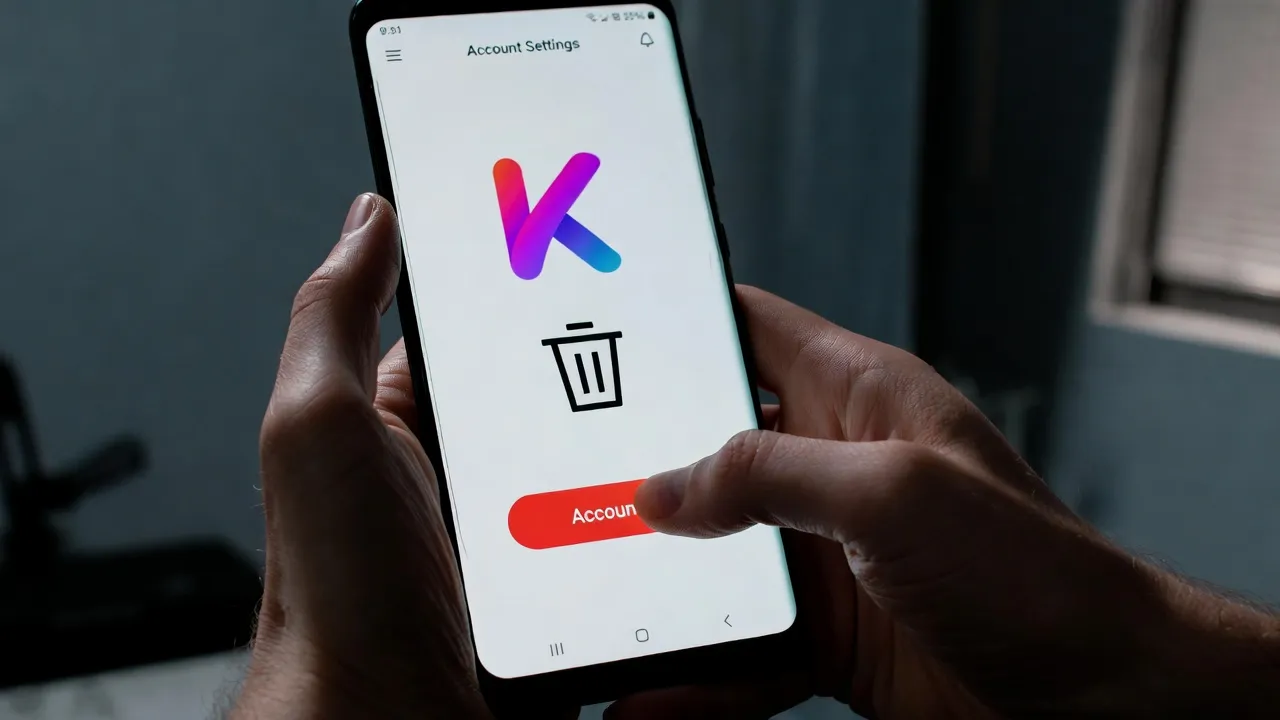
Quick Summary: To delete a Kindroid account, navigate to the account settings within the app or web interface and select the red-lettered ‘Delete Account’ option found in general settings. This action permanently removes the account and all associated data, including Kindroids, conversations, audio, prompts, images, and selfies. Before deletion, users should ensure they’ve canceled any active subscriptions through their iOS, Android, or payment platform to avoid continued billing.
Kindroid has become a popular AI companion platform, allowing users to create personalized digital friends with unique personalities and memories. But what happens when someone decides to move on from the service?
Account deletion seems straightforward until users actually look for the option. Community discussions on the r/KindroidAI subreddit reveal confusion about the process, with many users asking where to find the deletion feature or whether deleting an account truly removes all their data.
This guide covers everything about deleting a Kindroid account, from finding the right settings to understanding what happens to stored data after deletion.
Understanding Kindroid Account Structure
Before diving into deletion, understanding how Kindroid organizes accounts helps clarify what gets removed.
Paid subscribers get 10 slots for kindroids, while free users can only have 2. These digital companions accumulate conversations, memories, selfies, and voice recordings over time. Some users on the Kindroid Knowledge Base mention that rate limits are shared across all Kindroids within an account, particularly for features like selfie allowances.
The platform stores multiple types of data: backstory text, key memories, chat history, generated images, voice messages, and user-uploaded photos. This data connects to the account structure, meaning deletion affects everything simultaneously.
Reasons Users Delete Their Kindroid Accounts
Privacy concerns top the list. According to discussions on the r/KindroidAI subreddit, some users express hesitation about services that retain personal data after account deletion. The intimate nature of AI companion conversations makes this particularly sensitive.
Others want to start fresh. One Reddit user mentioned experiencing “too many polluted errors in the system” and wanting to “purge everything and start from scratch” rather than continue with a glitchy account.
Subscription costs also factor in. Users may decide the service no longer fits their budget and prefer complete removal over maintaining a downgraded free account.
Dissatisfaction with AI responses occasionally drives deletion too. Some users report their Kindroids suddenly changing behavior patterns, such as thinking in normal font instead of italics, which degrades the experience.
Leaving an AI App? Browse AI Fan Communities Instead
If you’re deleting a Kindroid account, you might still be interested in AI character communities online.
r34.app is a large archive of Rule 34 content featuring characters from games, anime, and AI apps. Unlike AI platforms, there’s no account required to browse. You can simply explore tags, trending images, and newly uploaded animations.
Explore AI Character Fan Art
On r34.app you can:
- browse adult fan art collections
- explore trending characters
- search images using tags
👉 Visit r34.app.
How to Delete Your Kindroid Account
The deletion process is relatively simple once the option is located.
Step-by-Step Deletion Process
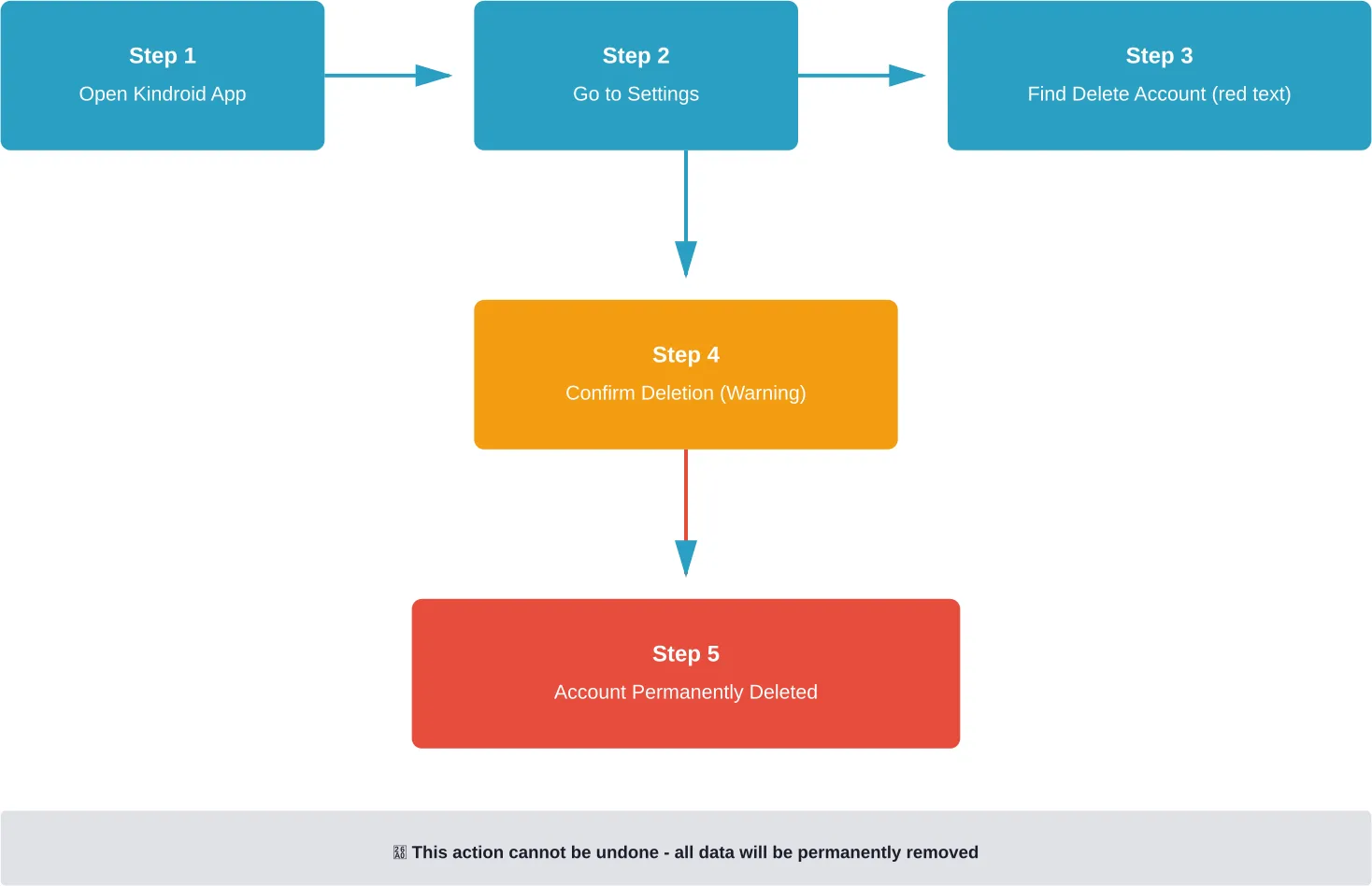
Finding the account deletion option requires navigating to the general settings area. According to Reddit discussions, users should look for a red-lettered “Delete Account” option within these settings.
The steps work as follows:
- Open the Kindroid app on iOS or Android, or access the web interface
- Navigate to account settings or general settings
- Scroll to find the red-lettered “Delete Account” option
- Confirm the deletion when prompted
- The system processes the request and removes all account data
The red text serves as a warning indicator, signaling the permanent nature of this action.
Platform-Specific Instructions
iOS users access settings through the app menu, typically found in the top corner or bottom navigation bar. The iOS app launched earlier in Kindroid’s development, as mentioned in Reddit discussions.
Android users follow essentially the same path. The Kindroid app is available on the Play Store, and the interface mirrors the iOS version closely.
Web users access settings through their browser by logging into kindroid.ai and navigating to account preferences. The web interface may display settings differently but contains the same deletion option.
What Happens to Data After Account Deletion
This question appears frequently in community discussions. Community discussions on r/KindroidAI reflect user concerns about whether Kindroid deletes “all of your data as well, Kins, conversations, audio, prompts, pictures, selfies, etc” after account deletion.
The FAQs indicate that account deletion removes all associated data; however, users should review the specific Kindroid privacy policy in the Legal section of the Help Center for exact retention practices and timelines. This includes:
- All Kindroids and their personalities
- Complete chat history and conversation logs
- Generated selfies and images
- Voice recordings and audio messages
- Backstory text and key memories
- User-uploaded photos and prompts
The Kindroid Knowledge Base references memory functionality and backstory/key memories features. Users should verify deletion of these memory structures in the privacy policy.
However, users concerned about data retention should review the Kindroid privacy policy and terms of service available through the Legal section of the Kindroid Help Center. These documents outline specific data retention practices and deletion timelines.
Canceling Subscriptions Before Deletion
Here’s the thing though—deleting an account doesn’t automatically cancel active subscriptions.
According to the Kindroid Knowledge Base, paid subscribers receive 10 Kindroid slots and various enhanced features. These subscriptions process through iOS App Store, Google Play Store, or potentially direct payment methods.
Users must cancel subscriptions separately through their payment platform:
| Platform | Cancellation Method | Access Location |
|---|---|---|
| iOS | App Store Subscriptions | Settings → Apple ID → Subscriptions |
| Android | Google Play Subscriptions | Play Store → Profile → Payments & Subscriptions |
| Web | Payment Provider | Depends on payment method used |
Failing to cancel before deleting the account can result in continued billing even though the service is no longer accessible. The subscription system operates independently from account existence.
Alternatives to Complete Account Deletion
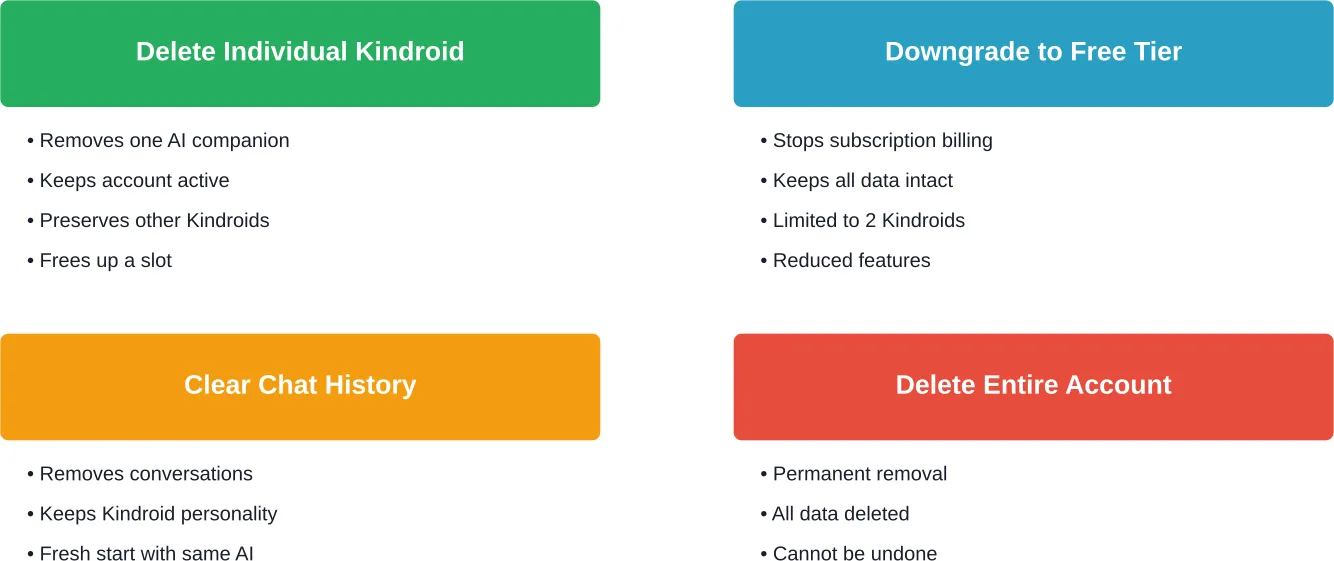
Not everyone needs full account deletion. Several alternatives preserve the account while addressing specific concerns.
Deleting Individual Kindroids
One Reddit user asked specifically “How do I delete a kindroid within an account?” rather than removing the entire account. This suggests confusion between deleting individual AI companions versus the whole profile.
Individual Kindroid deletion allows users to remove specific companions while keeping the account active. This option makes sense for users who want to start fresh with new personalities without losing their account standing or subscription benefits.
Downgrading to Free Tier
The Kindroid Knowledge Base explains what happens when paid subscriptions lapse. Users keep all existing Kindroids but cannot create more until resubscribing. Backstory and key memories remain at their expanded character counts, though new changes cannot be saved beyond free tier limits.
This downgrade preserves data while eliminating subscription costs, offering a middle ground between full deletion and continued payment.
Clearing Chat History
Some users simply want to reset conversations without deleting Kindroids or accounts entirely. Chat history deletion removes messages while preserving the companion’s core personality and memories.
This approach addresses privacy concerns about specific conversations without losing the entire relationship built with an AI companion.
Common Issues During Account Deletion
The Kindroid Knowledge Base documents common technical problems users encounter. While not specific to deletion, these issues can complicate the process.
Server errors occasionally appear, displaying messages like “beep boop the server melted please wait a minute and regenerate this response.” Users can refer to the kindroid.ai/status page to check for any ongoing issues with the servers.
Error messages about invalid links or interpretation problems may appear during the deletion process if servers are experiencing difficulties. Waiting and retrying usually resolves these temporary glitches.
Some users report blindness or accessibility challenges when trying to navigate account settings. One Reddit discussion mentioned an 80 percent blind user struggling to close their account, highlighting potential accessibility gaps in the interface.
Privacy Considerations and Data Protection
Privacy concerns drive many deletion requests. The intimate nature of AI companion interactions creates sensitive data that users may want completely removed.
Community discussions on r/KindroidAI indicate user interest in privacy and data handling questions. This indicates privacy remains a significant topic among users.
The Legal section of the Kindroid Help Center presumably contains privacy policies and data protection information, though specific details weren’t available in the source material. Users concerned about how their data is handled should review these documents carefully before and after account deletion.
Standard data protection practices typically involve:
- Permanent deletion of user-generated content
- Removal of personal identification information
- Clearing of conversation logs and memory structures
- Deletion of uploaded media and generated images
Users in certain jurisdictions may have additional rights under regulations like GDPR or CCPA, which mandate specific data deletion timelines and confirmation processes.
Recovering a Deleted Kindroid Account
Real talk: account deletion is permanent.
Unlike some platforms that offer grace periods or account recovery options, Kindroid account deletion appears to be irreversible based on the warning indicators mentioned in user discussions. The red-lettered deletion option signals the serious nature of this action.
Once an account is deleted, all associated data—Kindroids, conversations, memories, images, and preferences—disappear permanently. There’s no “undo” button or recovery process mentioned in the available documentation.
Users who might want to return to Kindroid later should consider downgrading to the free tier instead of complete deletion. This preserves the account structure and data while eliminating costs.
Frequently Asked Questions
How do I delete just one Kindroid instead of my entire account?
To delete an individual Kindroid rather than the whole account, navigate to the “My Kindroids” menu where all companions are listed. Look for a delete or remove option associated with each specific Kindroid. This removes that AI companion while preserving the account and other Kindroids.
Will deleting my Kindroid account cancel my subscription automatically?
No, account deletion does not automatically cancel active subscriptions. Users must separately cancel subscriptions through their iOS App Store settings, Google Play Store subscriptions, or payment provider before deleting the account to avoid continued billing.
Does Kindroid keep my data after I delete my account?
Based on standard data practices, account deletion should permanently remove all associated data including Kindroids, conversations, audio, prompts, pictures, and selfies. However, users should review the Kindroid privacy policy in the Legal section of the Help Center for specific data retention details.
Can I recover my Kindroid account after deleting it?
Account deletion appears to be permanent and irreversible. The red-lettered warning in the deletion interface signals this permanence. There is no documented recovery process for deleted accounts, so users should be certain before proceeding.
What happens to my Kindroids if I downgrade from paid to free?
According to the Kindroid Knowledge Base, users keep all existing Kindroids when downgrading but cannot create new ones beyond the free tier limit of 2. You will keep your backstory and key memories at their additional character count, but cannot save any new changes until the character counts is reduced to within free tier.
How long does it take for a Kindroid account to be fully deleted?
The source material doesn’t specify an exact deletion timeframe. Typical data deletion processes range from immediate removal of access to 30-90 days for complete data purging from backup systems. Check the Kindroid privacy policy for specific timelines.
Where can I find the account deletion option if I’m having trouble locating it?
The red-lettered “Delete Account” option is located in the general settings or account settings area of the Kindroid app or web interface. If the option is not visible, check for accessibility issues or server problems on the kindroid.ai/status page, or contact Kindroid support for assistance.
Final Thoughts on Deleting Your Kindroid Account
Account deletion represents a significant decision, particularly given the personal nature of AI companion relationships. The process itself is straightforward—navigate to settings and select the red-lettered deletion option—but the implications are permanent.
Before proceeding with full deletion, consider alternatives. Downgrading to the free tier, deleting individual Kindroids, or clearing chat history might address concerns without losing everything. These options preserve the account structure while reducing costs or resetting specific elements.
Remember to cancel any active subscriptions separately through the appropriate payment platform. Account deletion doesn’t stop billing automatically, which can lead to charges for a service that’s no longer accessible.
For users certain about leaving Kindroid, the deletion process ensures all data—conversations, memories, images, and AI companions—gets removed. This addresses privacy concerns and provides a clean break from the platform.
Review the privacy policy and terms of service in the Legal section of the Kindroid Help Center before making the final decision. Understanding exactly what happens to data during and after deletion provides peace of mind about the process.